July 2025 Release Notes
Last updated: September 19, 2025
AI is changing how software is built, and thus changing how you hire and upskill developers. This release helps you stay ahead of the curve.
With AI assistance in the IDE, you can now go beyond evaluating code correctness to assessing how candidates work in a real-world setting: how they use AI to write clean, efficient code and make tradeoffs. We’ve also added powerful productivity enhancements like Scorecard Assist to help you save time and surface stronger signals, faster. Some of these new capabilities are available as part of the AI Add-on package – look for them in the updates below.
On the developer side, new subscription plans and an AI-powered prep kit make it easier than ever for candidates to practice, certify, and grow. With SkillUp, your teams can build GenAI skills like Prompt Engineering, RAG, and Agent Building, and even launch custom certifications aligned to your needs.
Finally, Engage gives you the tools to stand out in a noisy market: host AI-native hackathons and spin up polished, branded microsites in minutes.
These updates are now live! Watch our webinar recording to learn more.
Screen
Test Variants
You can now create multiple variations of a test and deliver the correct one based on the candidate's input at login. This makes it easy to assess candidates working with different tech stacks—like Node.js, Python, or Java, using a single, streamlined test setup.
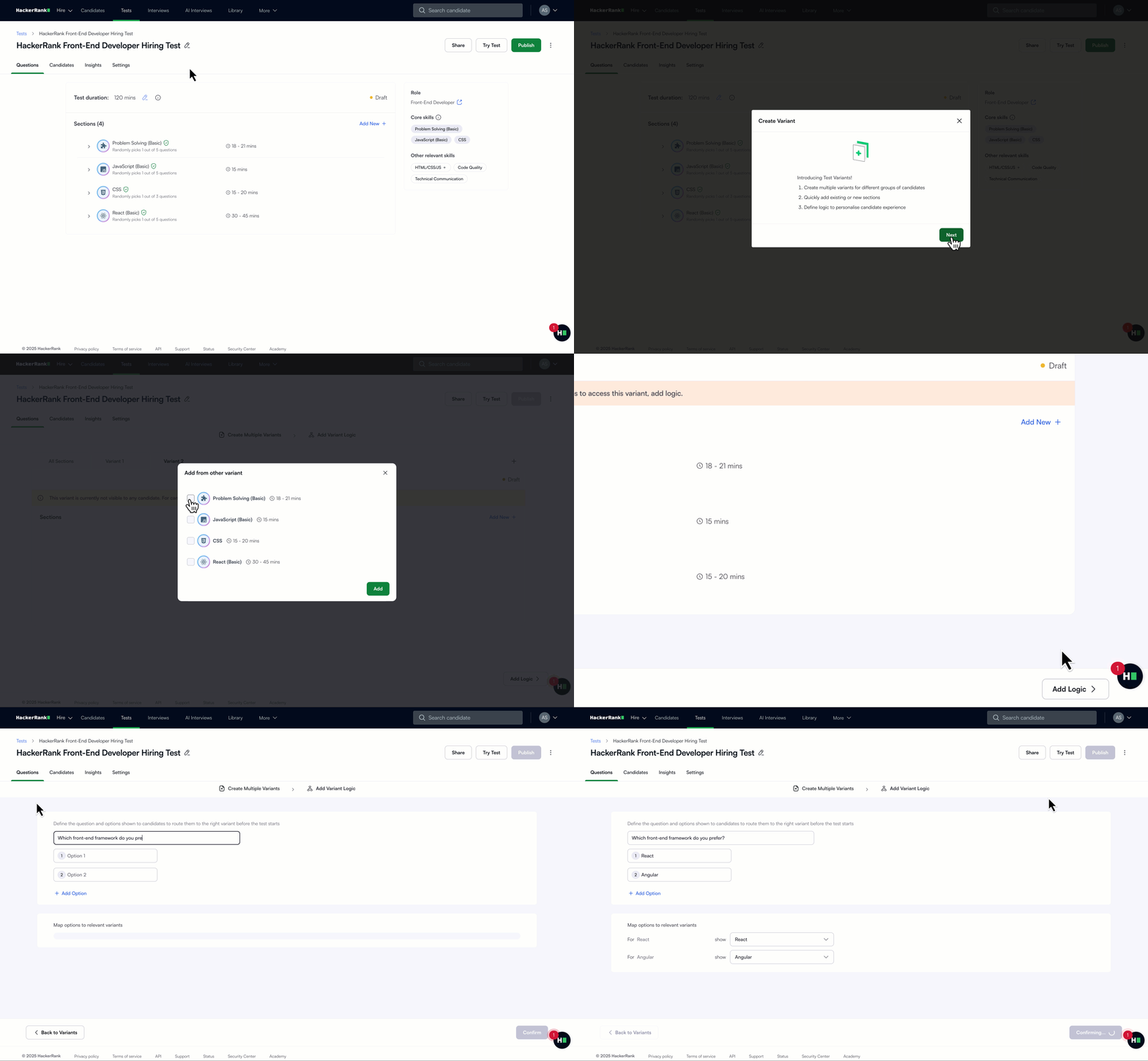
Candidates see only the sections relevant to them, and reports reflect just the variant they attempted, so insights stay clean, role-specific, and easy to evaluate. This reduces maintenance overhead while giving you the flexibility to personalize assessments at scale.
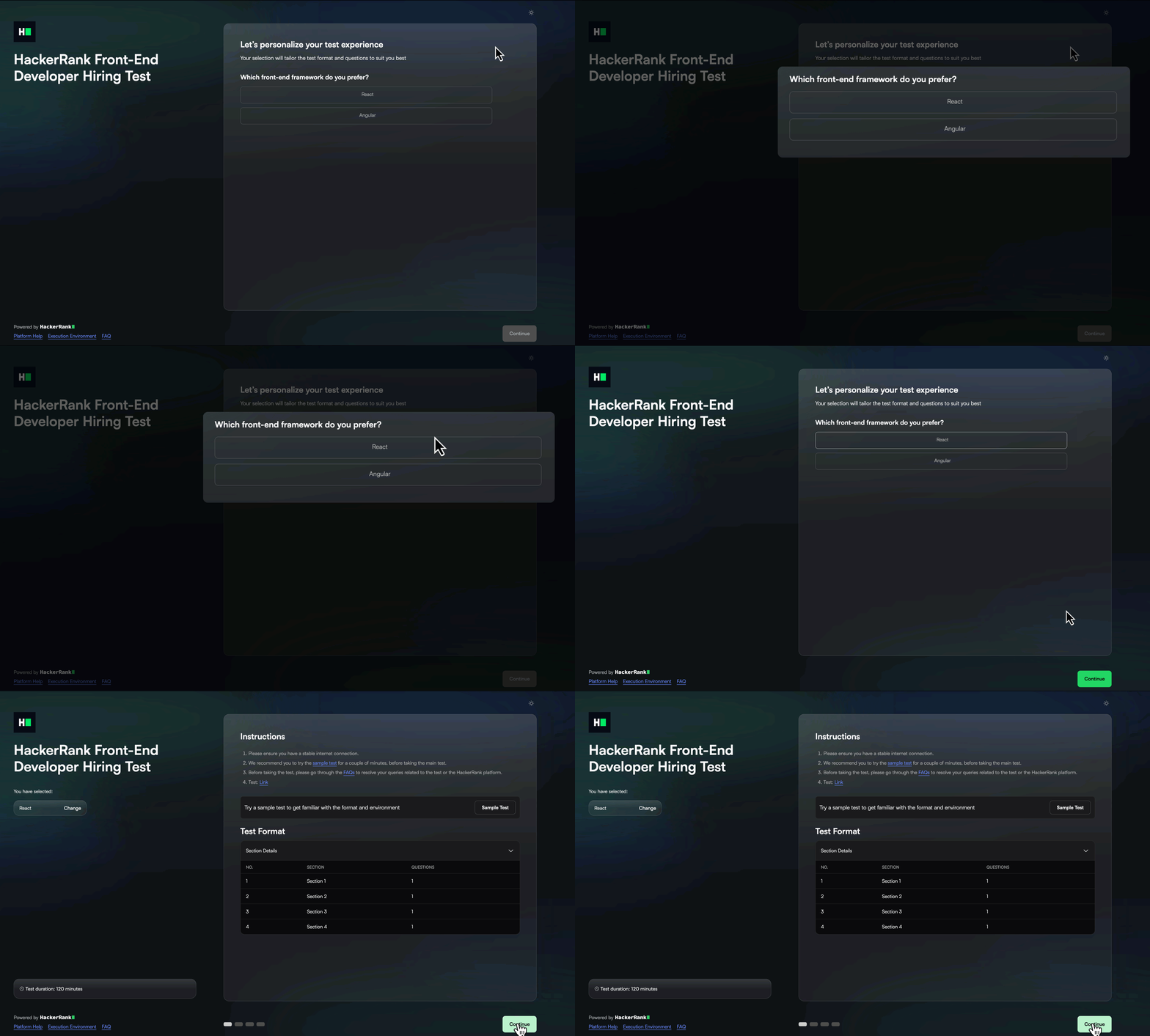
For more information, see 📄 Test Variants .
Enhancements to Test Settings
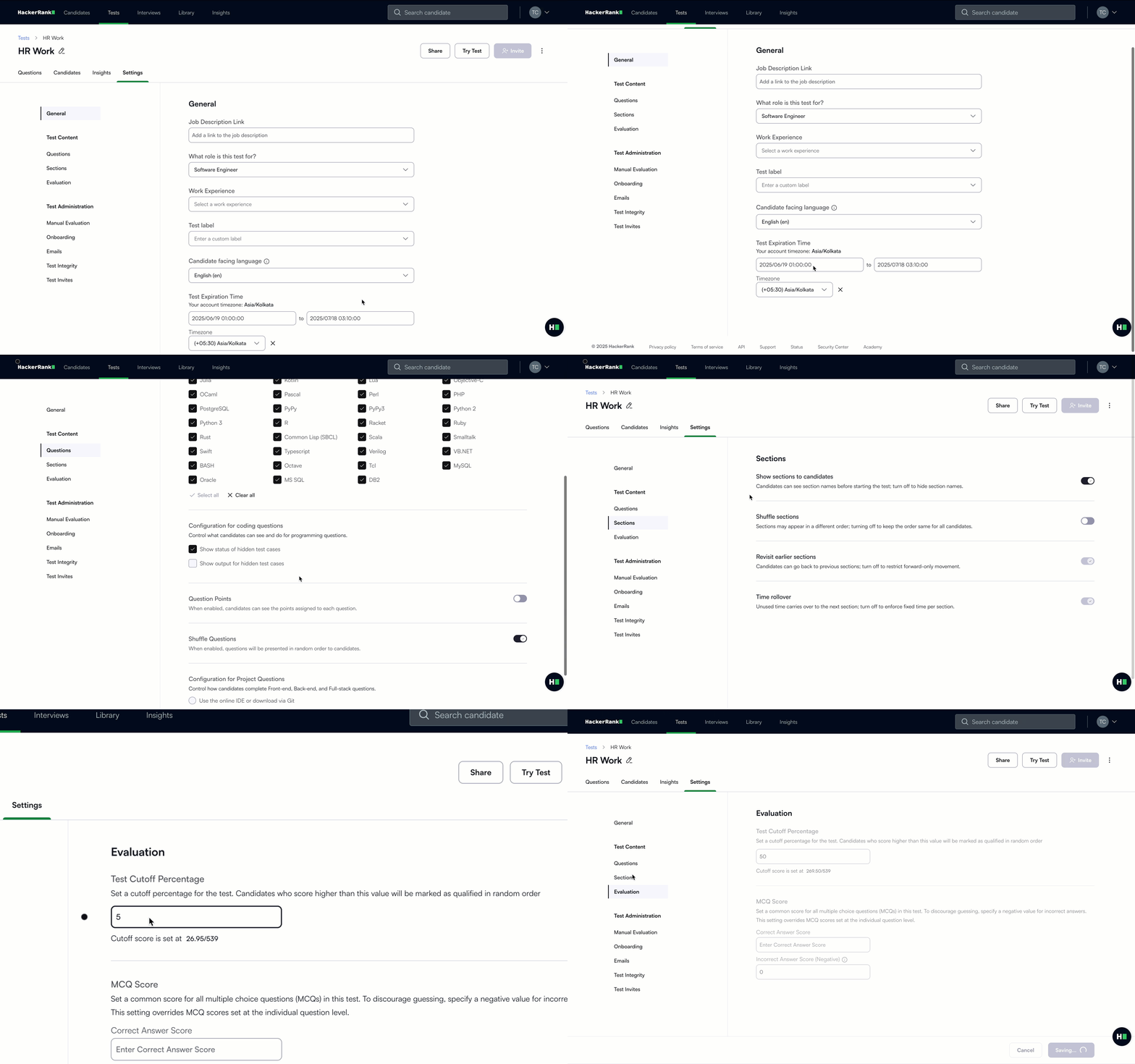
We have revamped the Test Settings to reduce complexity and improve usability. Settings are now grouped more intuitively. These changes simplify decision-making, enhance consistency across the platform, and lay the groundwork for smarter, organization-wide controls. Here are the highlights:
Streamlined Structure: Settings now follow the test creation flow - starting with questions, followed by sections, and ending with test invites.
Unified Section Controls: Section settings are consolidated, eliminating repetitive edits.
Sticky Save: A persistent reminder ensures changes aren’t lost.
New Options: Add cutoff percentages (not just scores) and define test invite expiry by duration or end date.
For more information, see 📄 Modify General Settings for Tests, 📄 Modify Question Settings for Tests, 📄 Modify Sections Settings for Tests, 📄 Modify Evaluation Settings for Tests, 📄 Configure Onboarding Settings for Tests, 📄 Configure Email Settings for Tests, 📄 Configure Test Invites Settings for Tests.
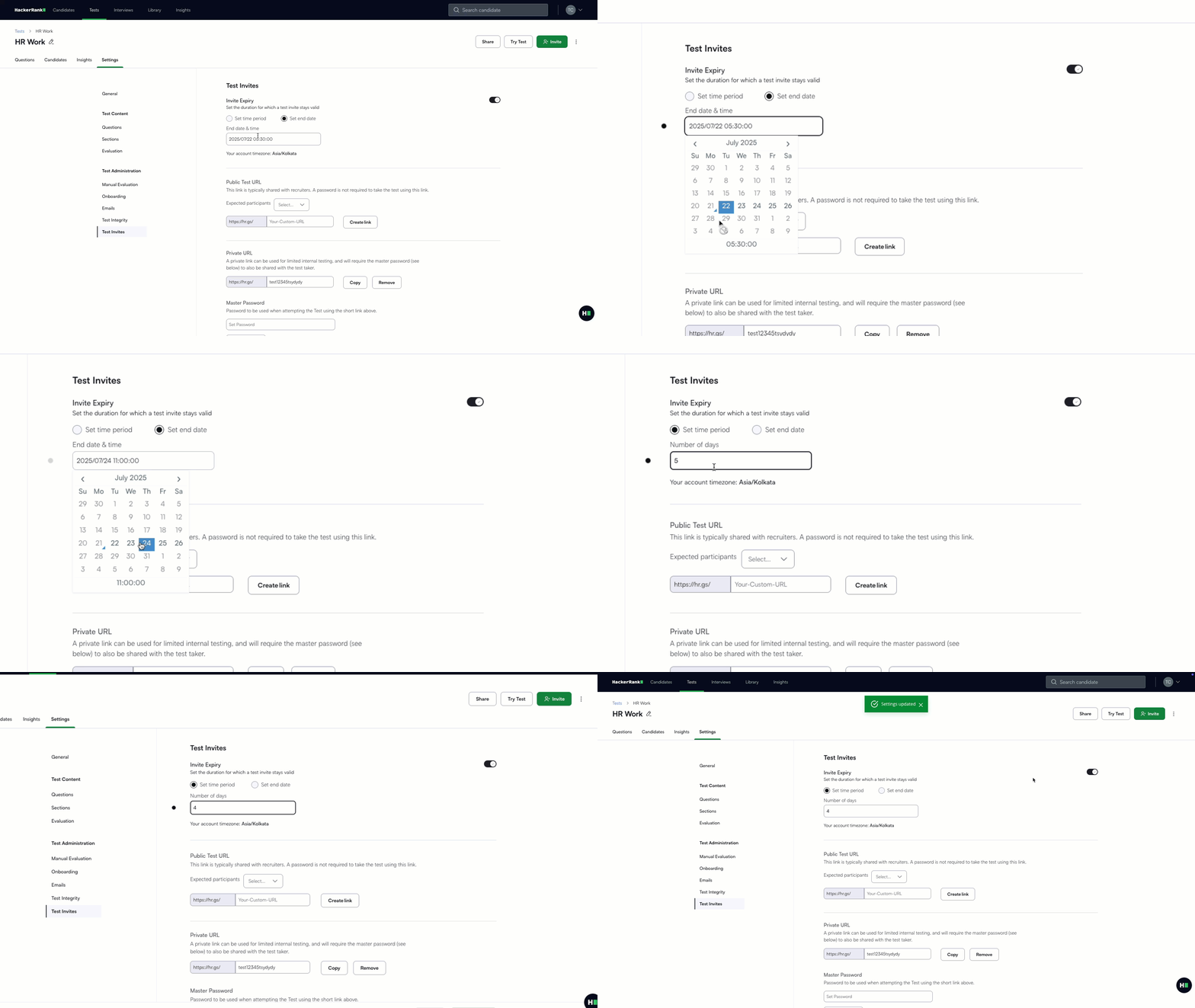
Set Custom Invite Expiration for Tests
You can now define how long a test invite stays active directly at the test level. Set a specific end date or define a custom duration to fit your needs. This gives you more flexibility to tailor expiration windows without being tied to a global default.
For more information, see 📄 Configure Test Invites Settings for Tests.
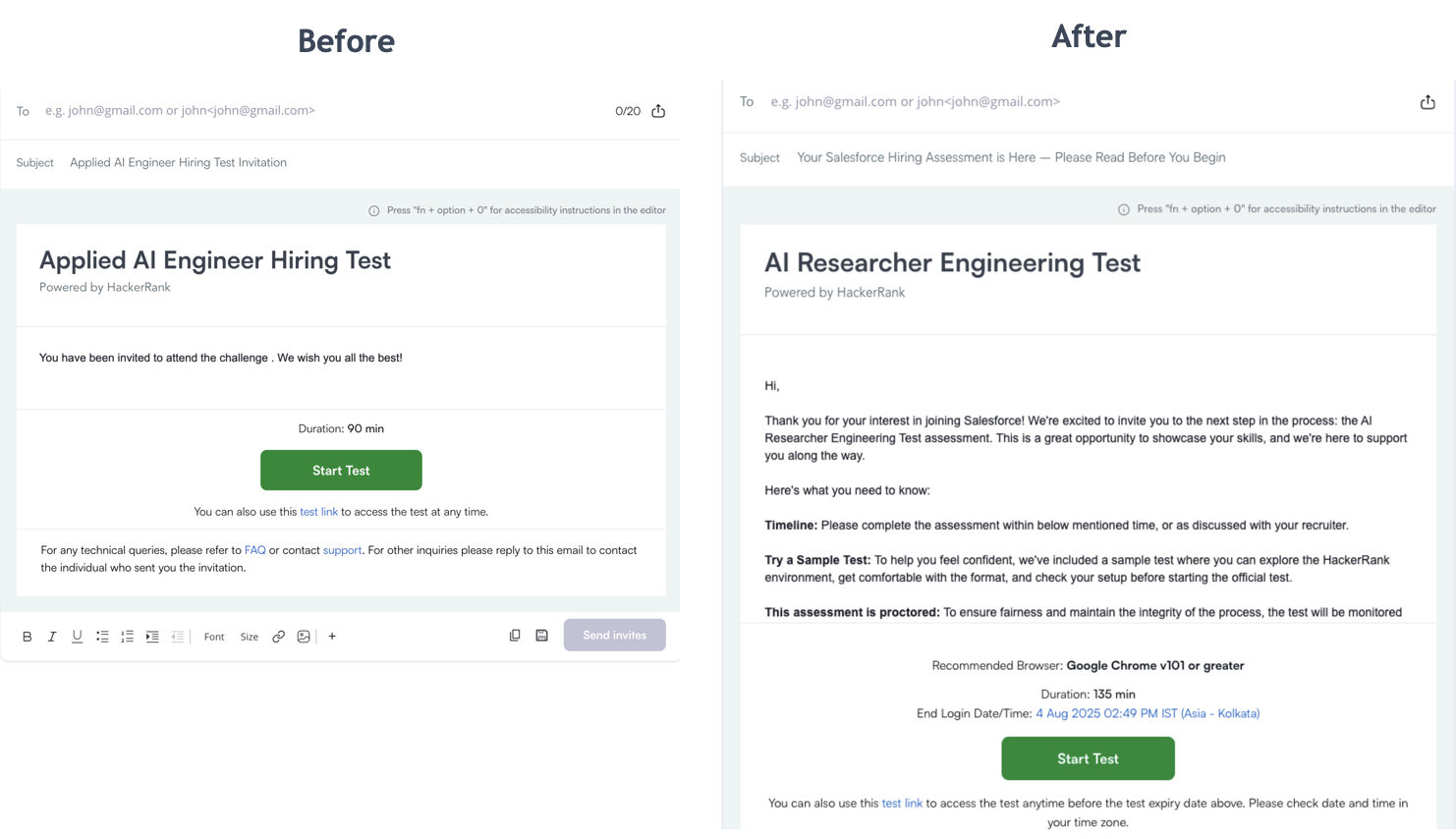
Updated Default Invite Template
The default test invite template now includes clearer instructions, an improved tone, and a preview of the sample test. This helps candidates feel more confident and better prepared, thus helping you get more candidates into your funnel with no extra effort.
Screen Features Available in the AI Add-on Package
The AI Add-on package includes advanced features that help you assess next-gen skills and maintain interview integrity in an AI-native world. It’s built to solve emerging challenges with the right level of depth and control. For more details, contact your account manager or email support@hackerrank.com.
AI-Assisted Tests
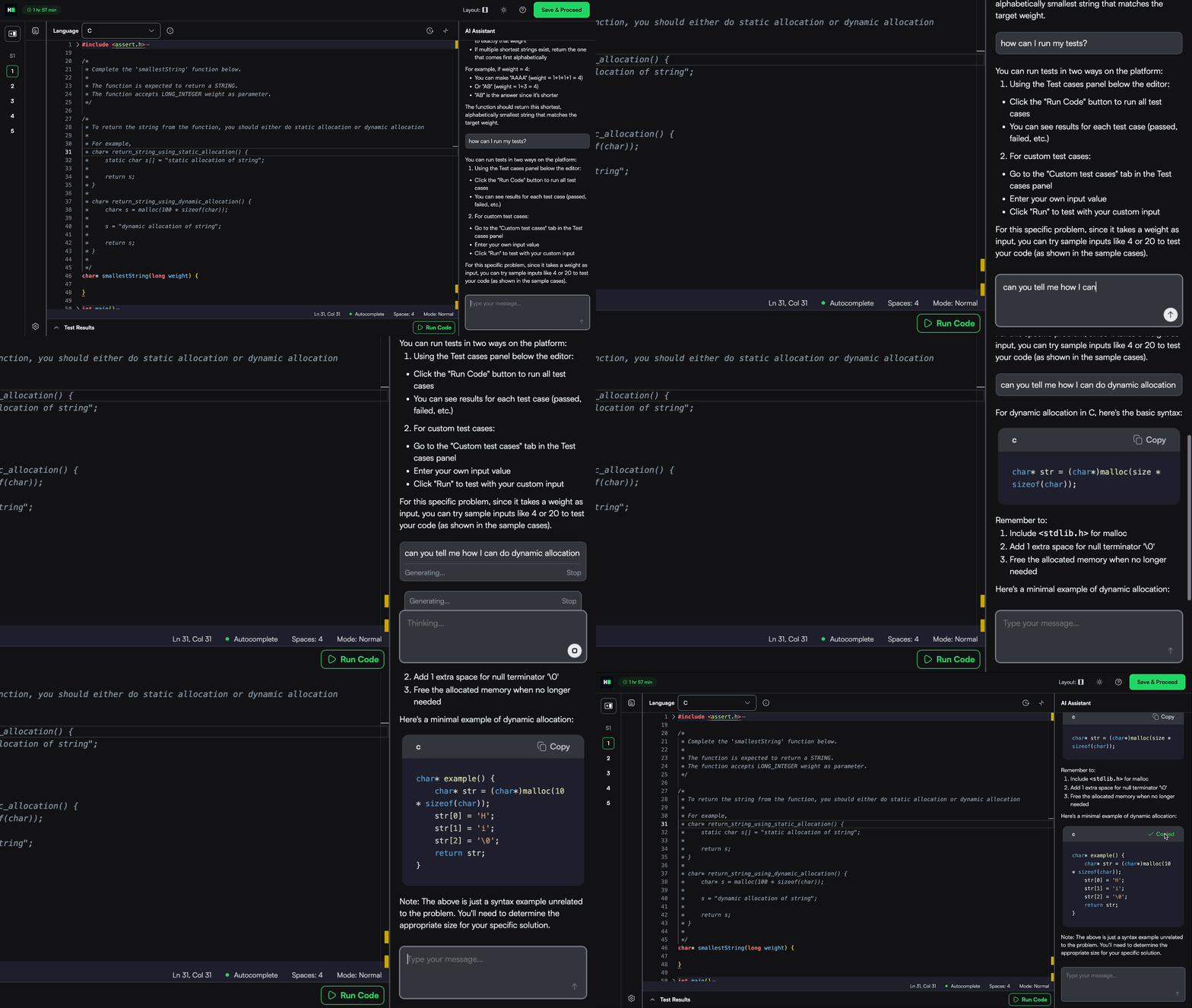
Upgrade your tests with an AI-assisted IDE that offers candidates contextual help like syntax tips, templates, and platform guidance without giving away full solutions. It mirrors how developers work today, while keeping assessments fair.
Get a complete view of each candidate’s approach with advanced evaluation, which includes signals like code quality, optimality, and AI usage summaries, along with full chat transcripts.
AI-Assisted IDE
Enable intelligent, AI-first coding assistance for candidates, designed to boost productivity and give you visibility into how candidates use AI in real-world coding tasks.
Chat: Explains code, clarifies questions, and provides syntax support without giving away full solutions.
AI autocomplete: Offers inline and multi-line code completions to accelerate development.
AI Assistant supports Coding, Frontend, Backend, Mobile, Full-Stack, and Code Repo question types.
For more information, see 📄 AI-Assisted Tests.
Advanced Evaluation
With AI assistance, hiring decisions cannot rely on pass/fail test case results alone. As a hiring manager, you need to understand how a candidate thinks, builds, and uses AI to get there. Advanced Evaluation helps you do exactly that by surfacing deeper insights into code quality, problem-solving behavior, and AI collaboration, offering a more comprehensive view of real-world skills.
For more information, see 📄 Advanced Evaluation.
Code Quality Grading
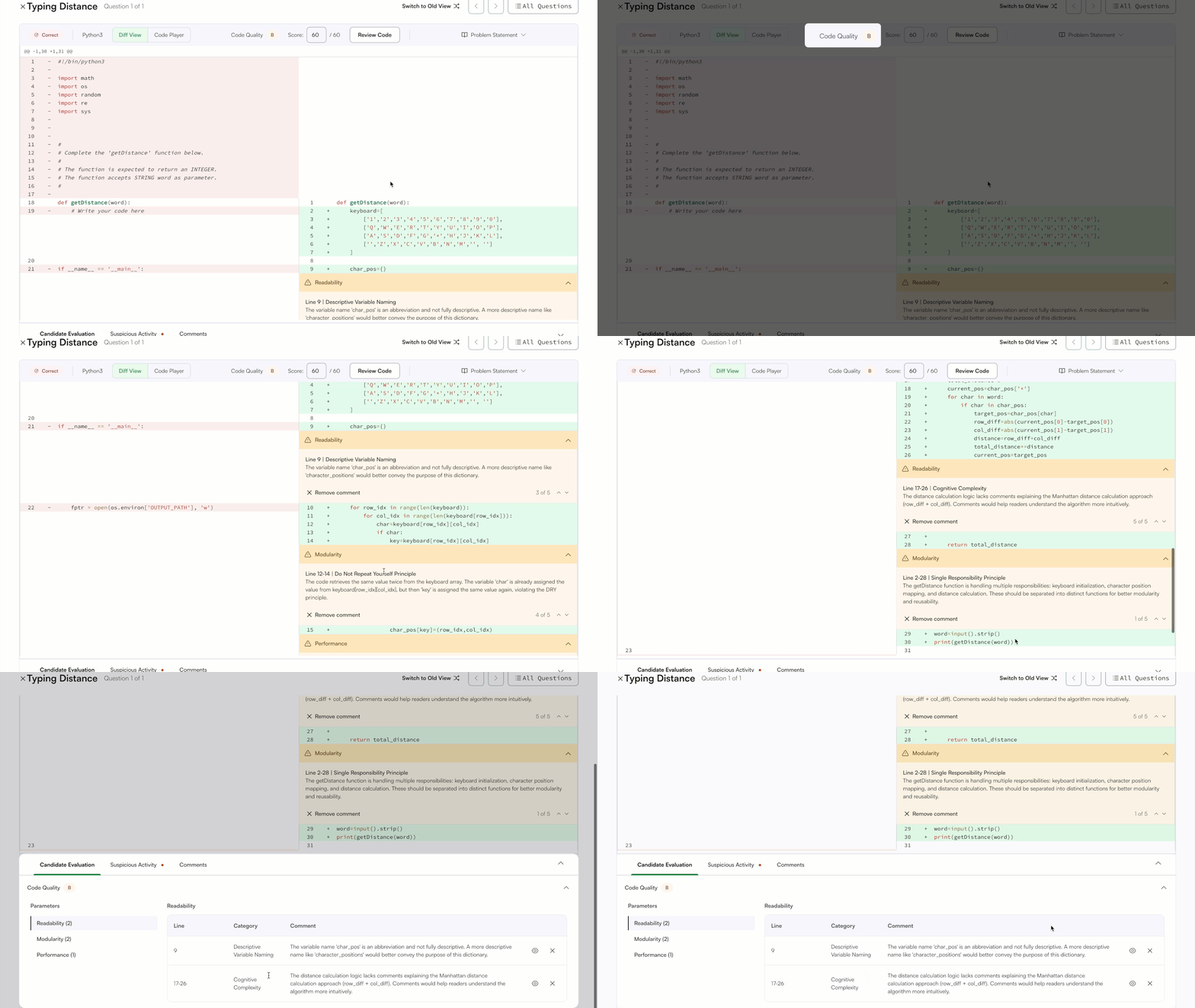
Production-ready code needs to be readable, maintainable, and efficient, in addition to being functionally correct. Code Quality Grading highlights how well a candidate writes code that others can understand and build on. You’ll see reviewer-style comments that call out strengths and suggest improvements, so you can quickly gauge craftsmanship, not just correctness.
For more information, see 📄 Code Quality Evaluation.
Optimality
Great code should also scale. Optimality scores candidate solutions based on time and space complexity, so you can evaluate performance under real-world constraints.
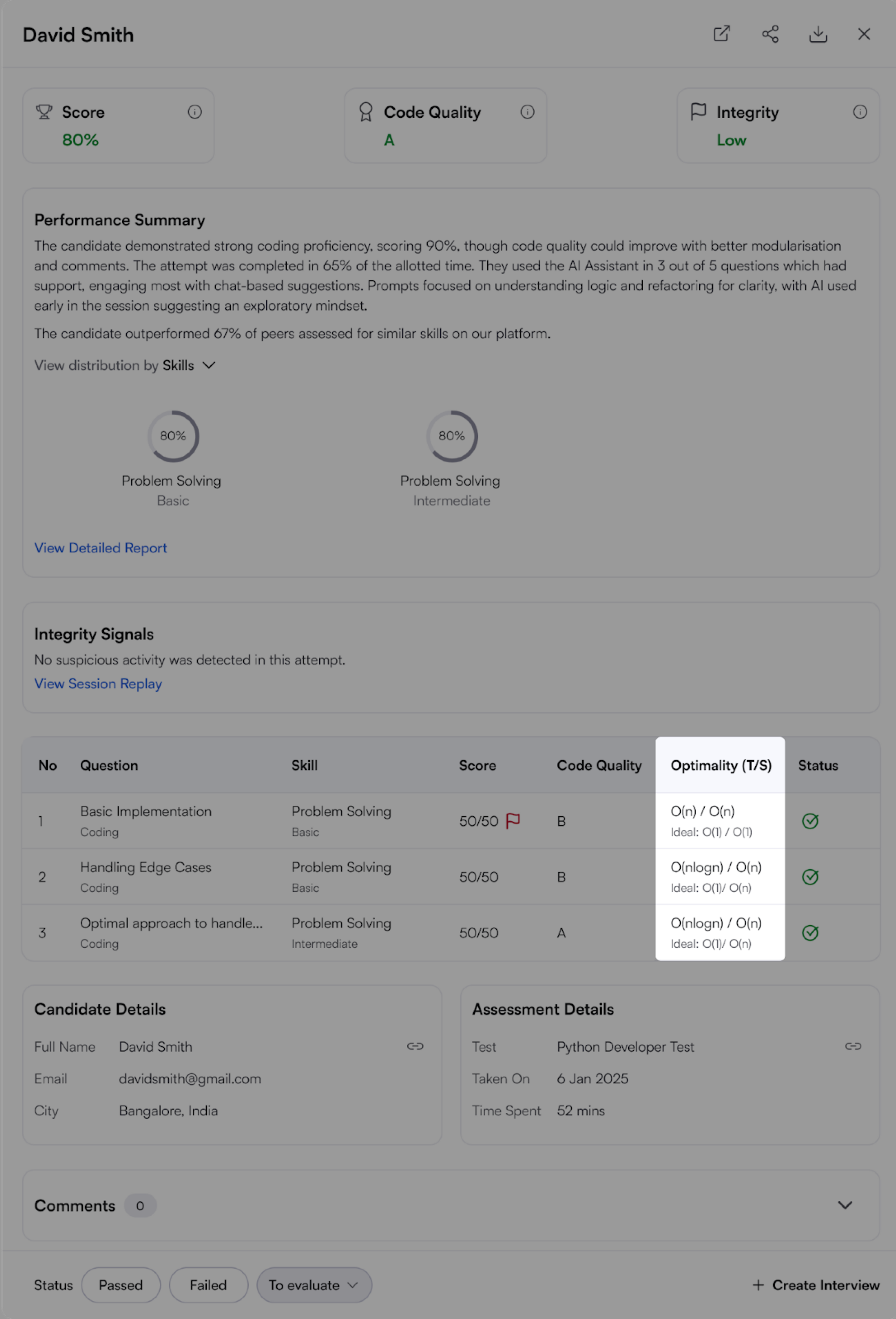
For more information, see 📄 Optimality .
AI Usage Summary
The AI usage summary gives a clear, concise view of how the AI assistant was used during each test. It is available in both the performance summary report and the detailed, question-level report.
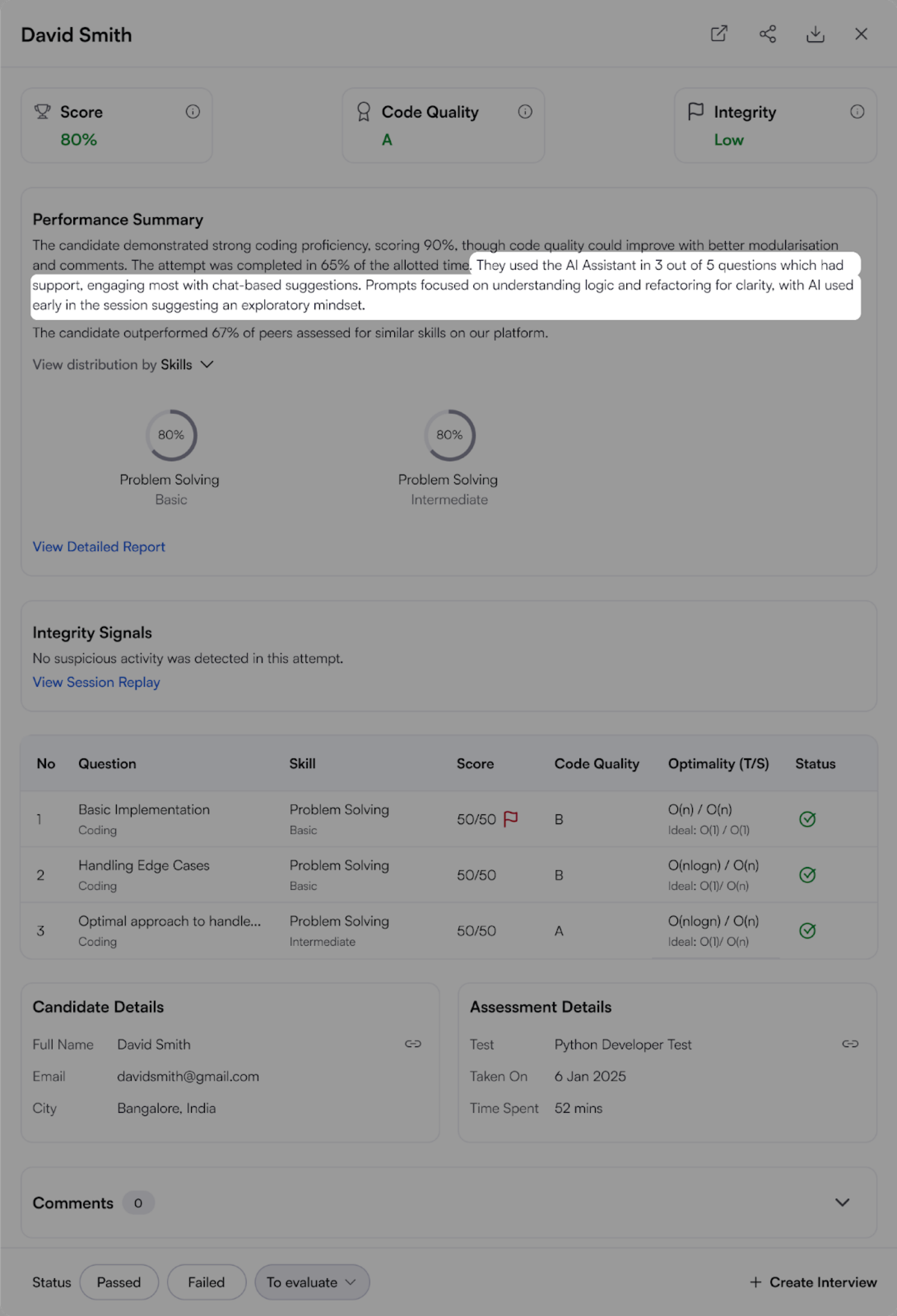
Any test with supported question types can be upgraded to the AI-assisted experience. All others will continue using our existing test experience.
For more information, see 📄 AI Usage Summary.
Enhanced Proctor Mode
Note: Must be a new test with no attempts.
Proctor Mode brings AI-powered integrity monitoring to your assessments, offering the rigor of live proctoring without the overhead. It tracks webcam activity, tab switches, and takes screenshots during the test, delivering a post-test report with a full session replay and summarized violations.
With this release, Proctor Mode is now generally available within the AI add-on package, featuring major enhancements that reduce the manual effort required for reviewing candidate reports and expand coverage to more question types.
Block Multiple Monitors: Candidates must use a single monitor. Tests won’t start (or will be paused) if multiple monitors are detected. This feature is supported on Chrome and Edge browsers. If a candidate tries to access the test using an unsupported browser like Firefox or Safari, they’ll be prompted to switch before starting.

Session Replay in Candidate Reports: You can now watch a complete recording of a candidate’s test session directly from the report. Session Replay captures the entire test-taking browser tab along with webcam images and system screenshots in one place. A timeline with key events, such as full-screen exits, tab switches, suspicious webcam activity, and screenshots, helps you quickly review critical moments for deeper insight into performance and integrity.
Screenshot Analysis: Periodic screenshots are now automatically analyzed for potential signs of suspicious activity.
Expanded Question Type Support: Proctor Mode now supports a broader range of question types, including multiple-choice, coding, sentence completion, file upload, and all Projects except DevOps. Support for additional question types is coming soon, giving you even more flexibility in secure assessments.
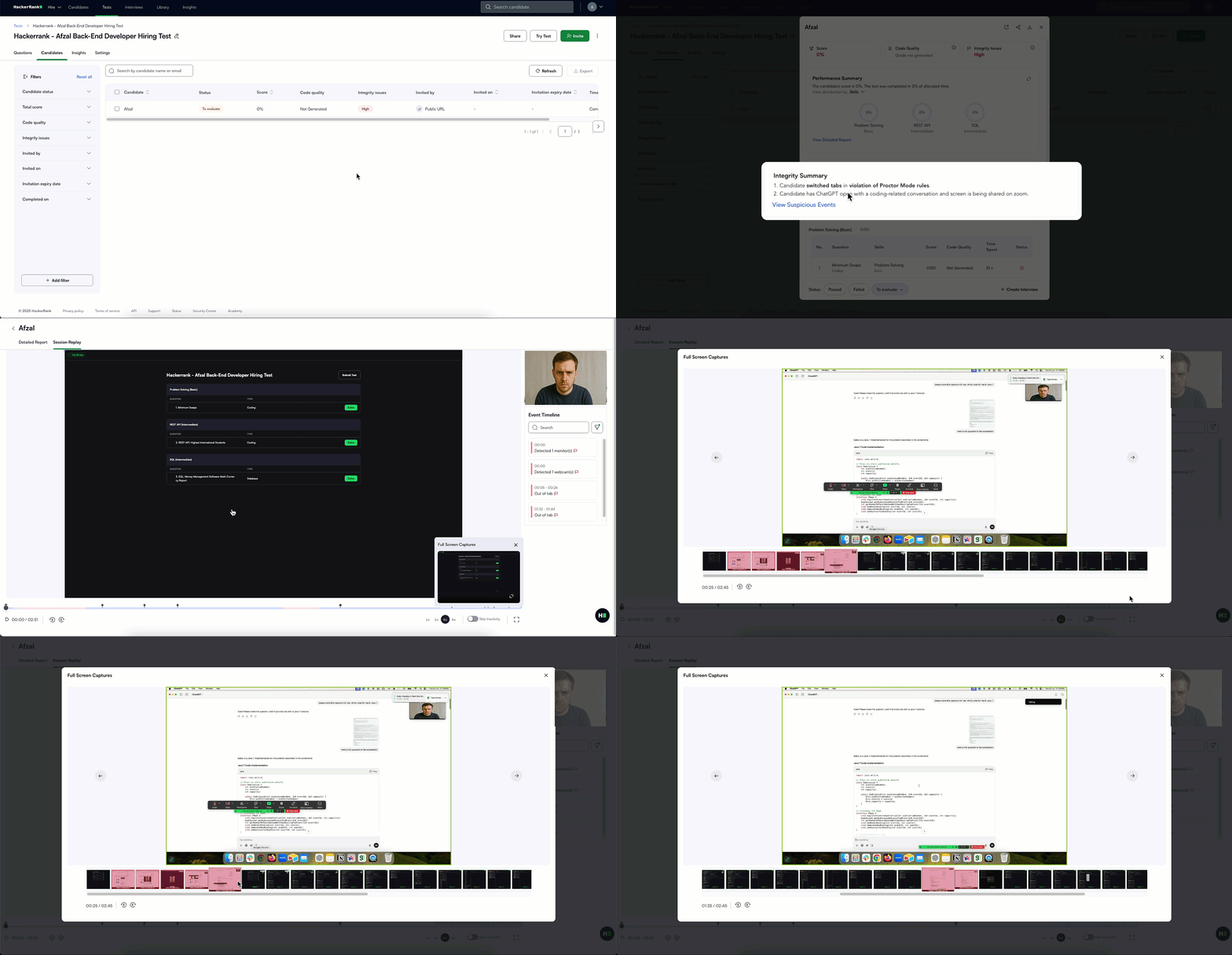
For more information, see 📄 Proctor Mode.
Skills Platform
iOS Assessments
Hiring iOS developers just got easier. You can now assess iOS development skills in an environment that mirrors how iOS apps are actually built, with a multi-file structure, Swift syntax support, and intelligent autocomplete. These assessments also support frameworks like SwiftUI.
Candidates write and run their code with a built-in iOS emulator, so you can preview the actual app experience. That means you’re not just testing if it works. You’re seeing how it looks, feels, and performs.
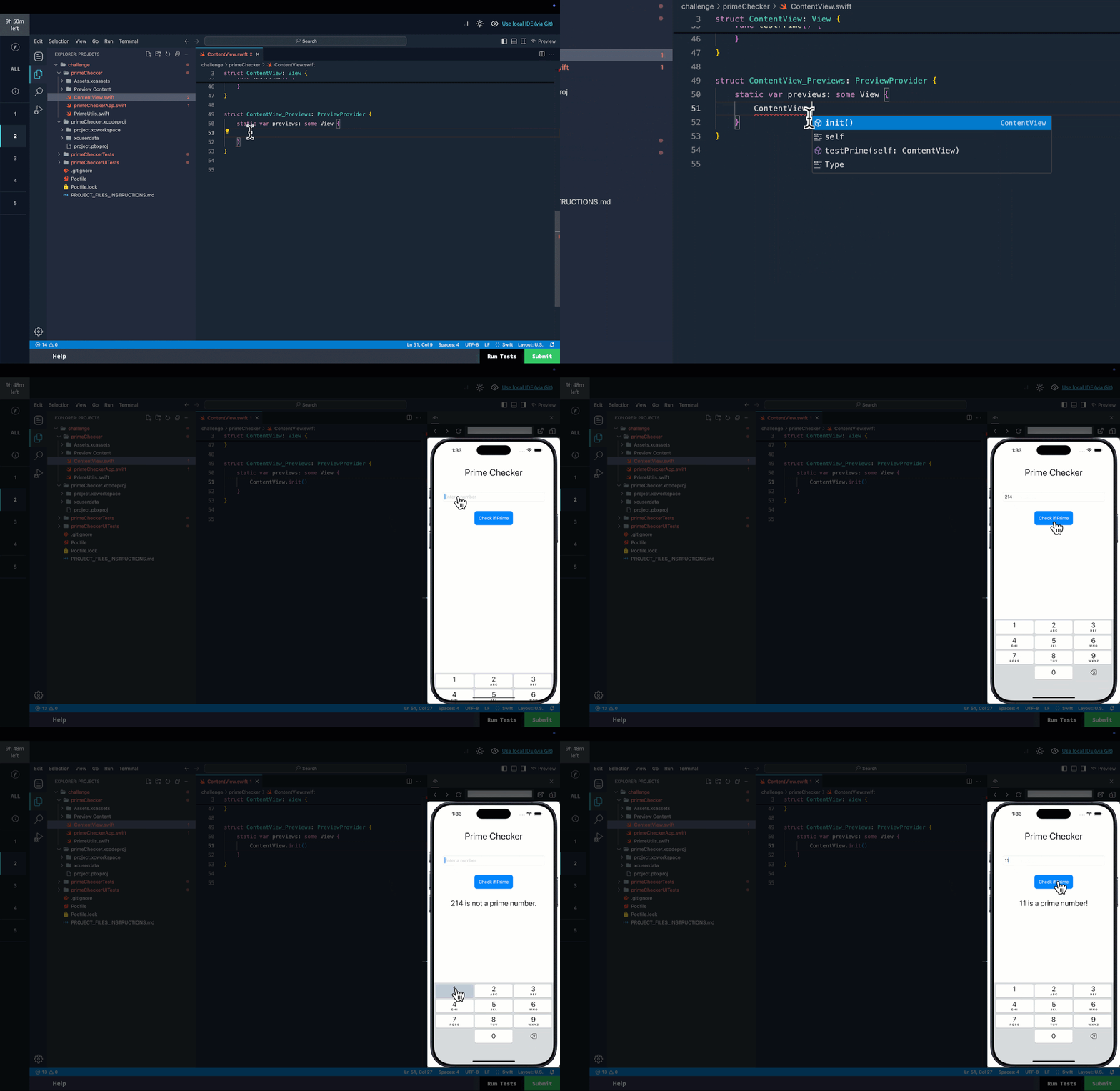
For more information, see Using HackerRank IDE.
Flox
We now support Flox, giving you the flexibility to create and run custom questions using the Flox package manager. With Flox, you can define consistent, reproducible environments directly within your question setup, making it easier to test candidates on real-world tooling and workflows. This is especially useful for teams working with custom dev environments.
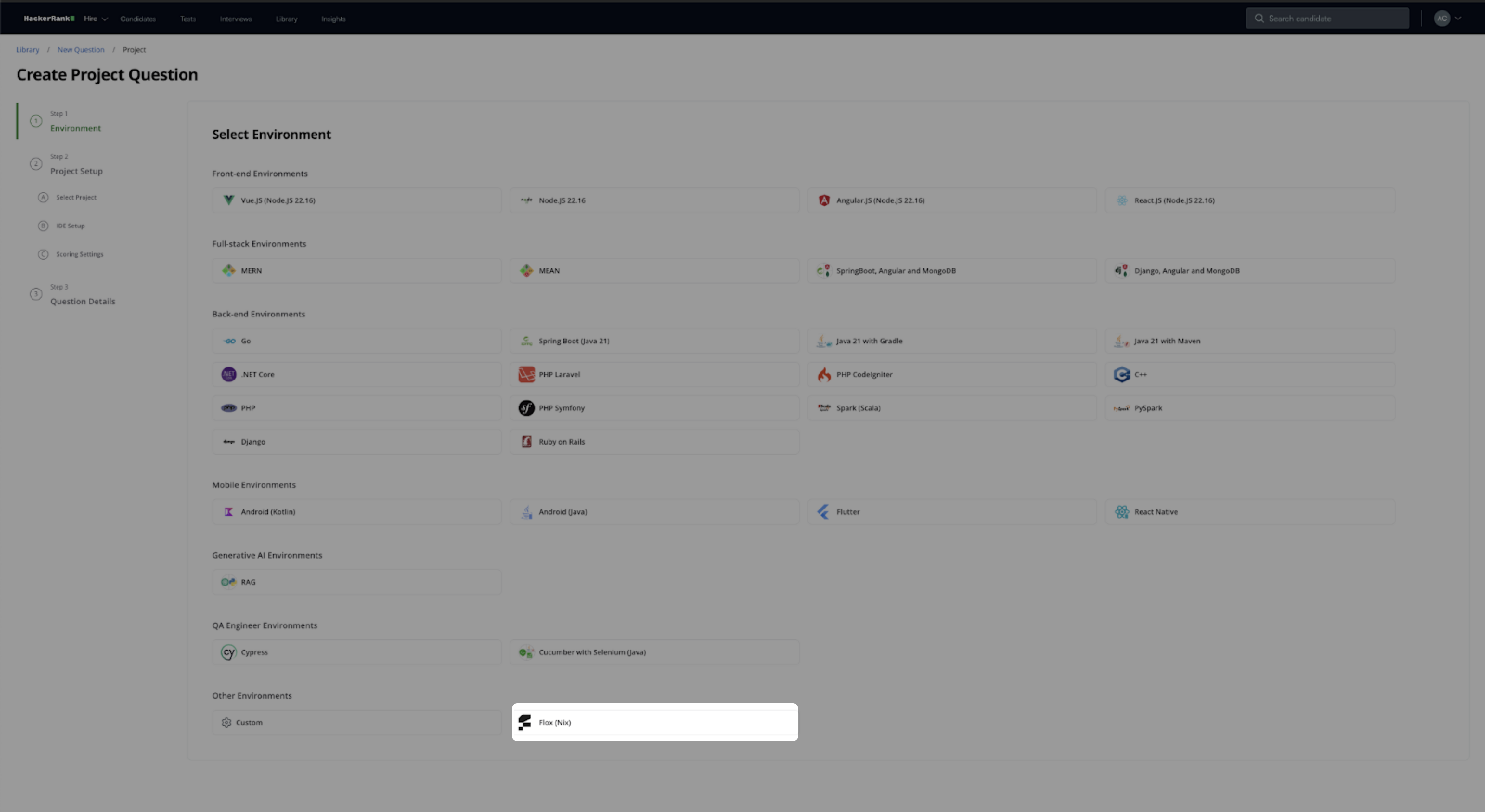
For more information, see Execution Environment.
Library Improvements
New Content
We’ve expanded our content library to help you assess a broader range of skills.
99 new coding challenges that test algorithmic reasoning and implementation efficiency.
41 new project tasks that test a candidate's ability to manage and execute complex real-world tasks.
Content additions across the following high-demand job families:
Job Family | Skill | Question Type |
AI/ML | Python | Data Science |
AI/ML | R | Data Science |
AI/ML | RAG | GenAI |
Mobile | Android | Projects |
Mobile | iOS | Projects |
Mobile | Flutter | MCQs |
Mobile | Swift | Coding |
Mobile | Cucumber | Projects |
Quality Assurance | Problem Solving | Coding |
Software Engineering | SQL | Database |
Cloud | Salesforce | MCQs |
Cloud | GCP | MCQs |
Cloud | SAP | MCQs |
Web Development | Node.js | Projects |
Web Development | Node.js | MCQs |
Data Engineering | Redis | MCQs |
Data Engineering | Snowflake | MCQs |
Data Engineering | Informatica | MCQs |
Content Quality Upgrades
The HackerRank library continues to evolve to improve clarity, precision, and ease of use, while supporting effective skill assessment.
We’ve rewritten over 70% of our hands-on questions, making the experience smoother for candidates and more consistent for reviewers. Every update has been validated against our quality standards to ensure fairness, accuracy, and rigor.
Original Question | Improved Question |
You are required to customize a class named
The default
Add more functionality to the existing method
Additionally, you are asked to overload this method so that it accepts
There are three overloaded versions of
| Customize a class called
Implement three versions of the
|
Developer Experience
New Candidate Site - Projects and Sentence Completion Questions
Building on last quarter’s redesign for Coding, MCQ, and Database questions, we’ve now extended the streamlined candidate interface to more question types - Frontend, Backend, Mobile, Full-Stack, GenAI, and Sentence Completion.
As part of these updates, candidates can now easily reset a project, making it simpler to start fresh during a test attempt. Additionally, test execution is now more natural and integrated output traces are displayed directly within the IDE terminal, enhancing visibility and reducing context switching.

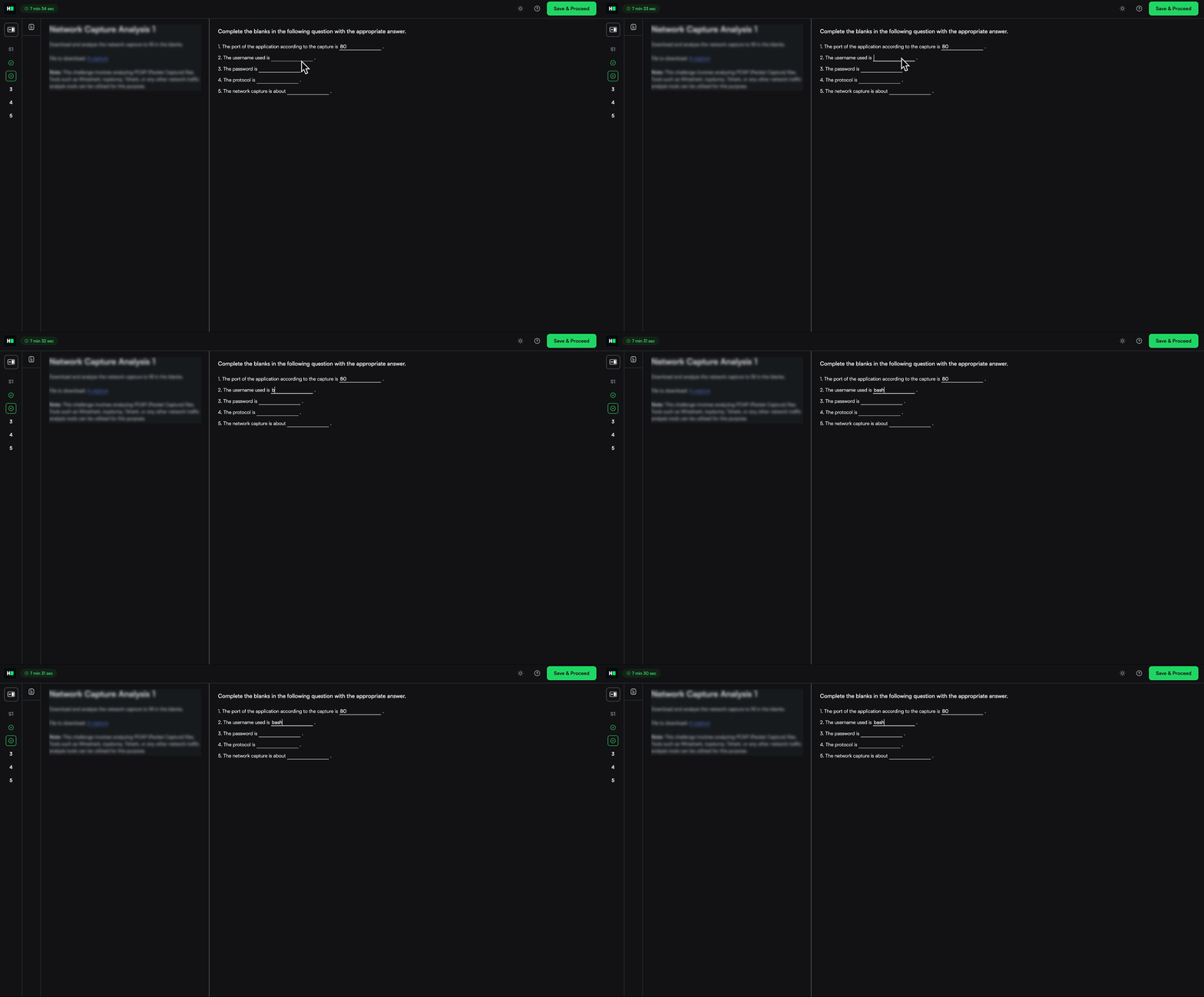
For more information, see Taking Front-end, Back-end, Full-stack, and Mobile Developer Assessments.
Data Science Assessment Improvements
Submission Check for Candidates
Submitting an incorrect file shouldn't get in the way of a great result. Candidates now get an automatic submission check when clicking Submit, confirming that their submission.csv file is present, correctly named, and properly formatted.
The system flags common issues like:
Missing or misnamed submission.csv
Incorrect column names
Invalid data types
This reduces preventable errors and helps ensure candidates get credit for the work they’ve done.
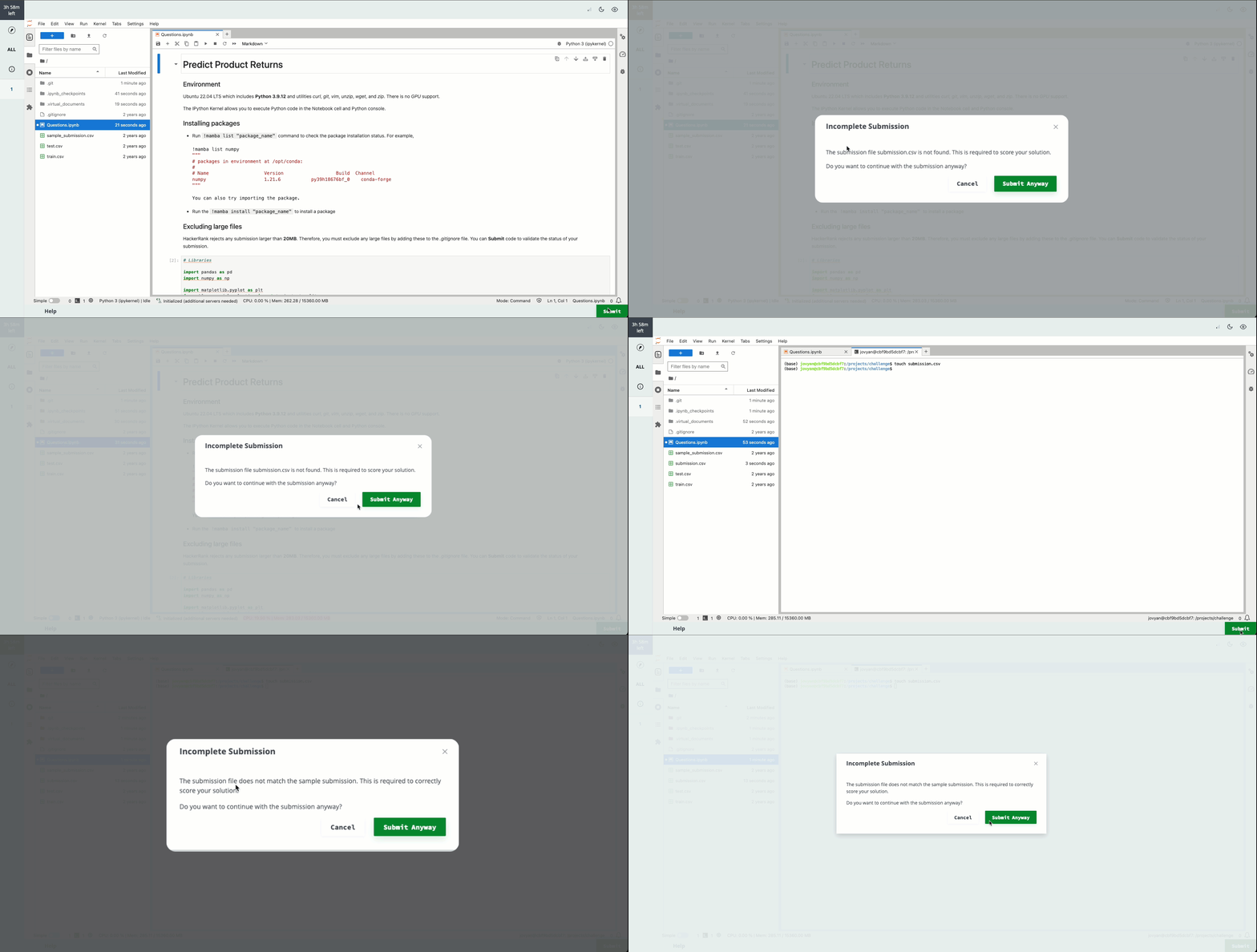
For more information, see Answer Data Science Questions.
Upgraded JupyterLab IDE
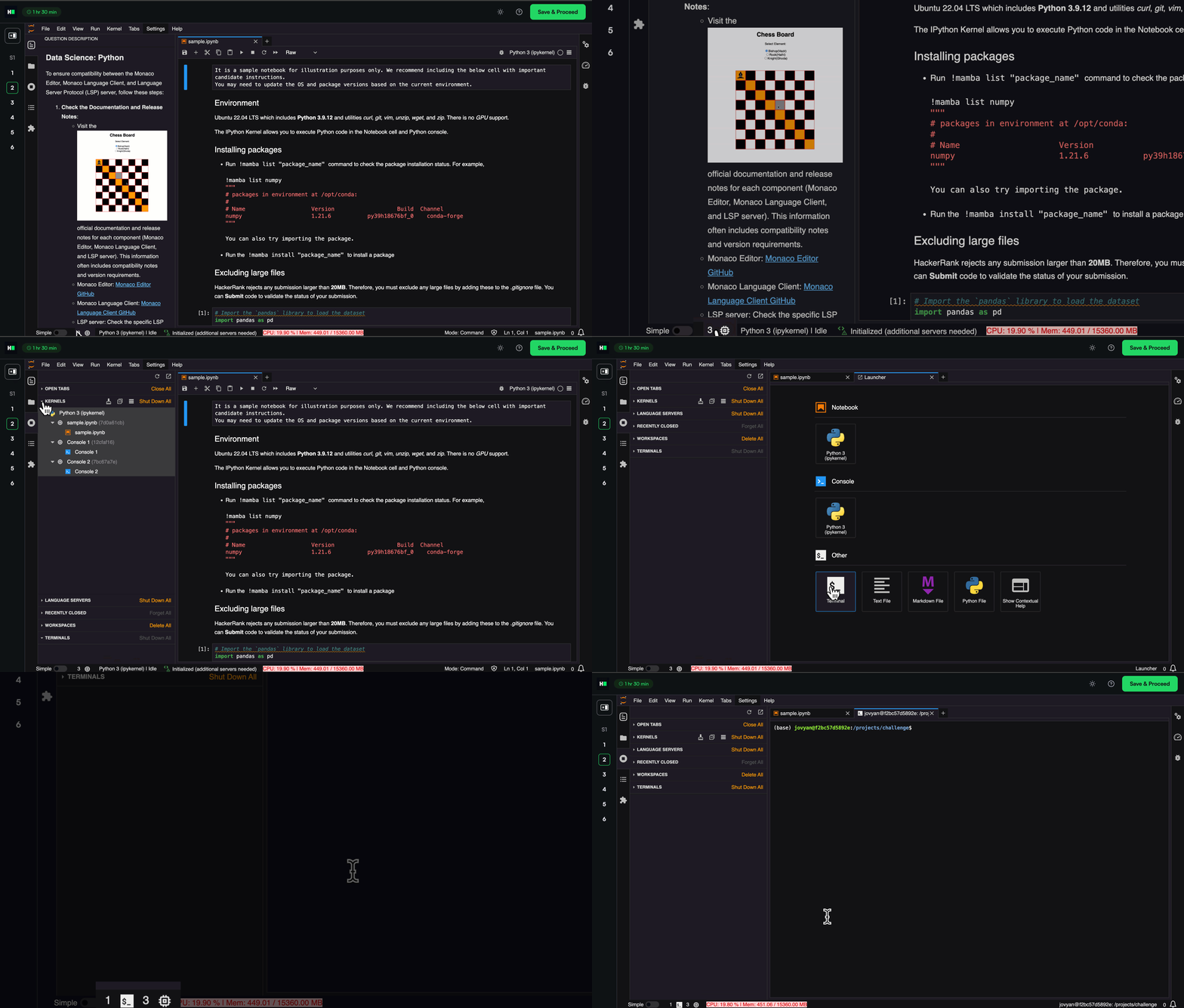
We’ve upgraded to JupyterLab 4.4.1 to deliver a smoother, faster, and more intuitive experience for data science candidates.
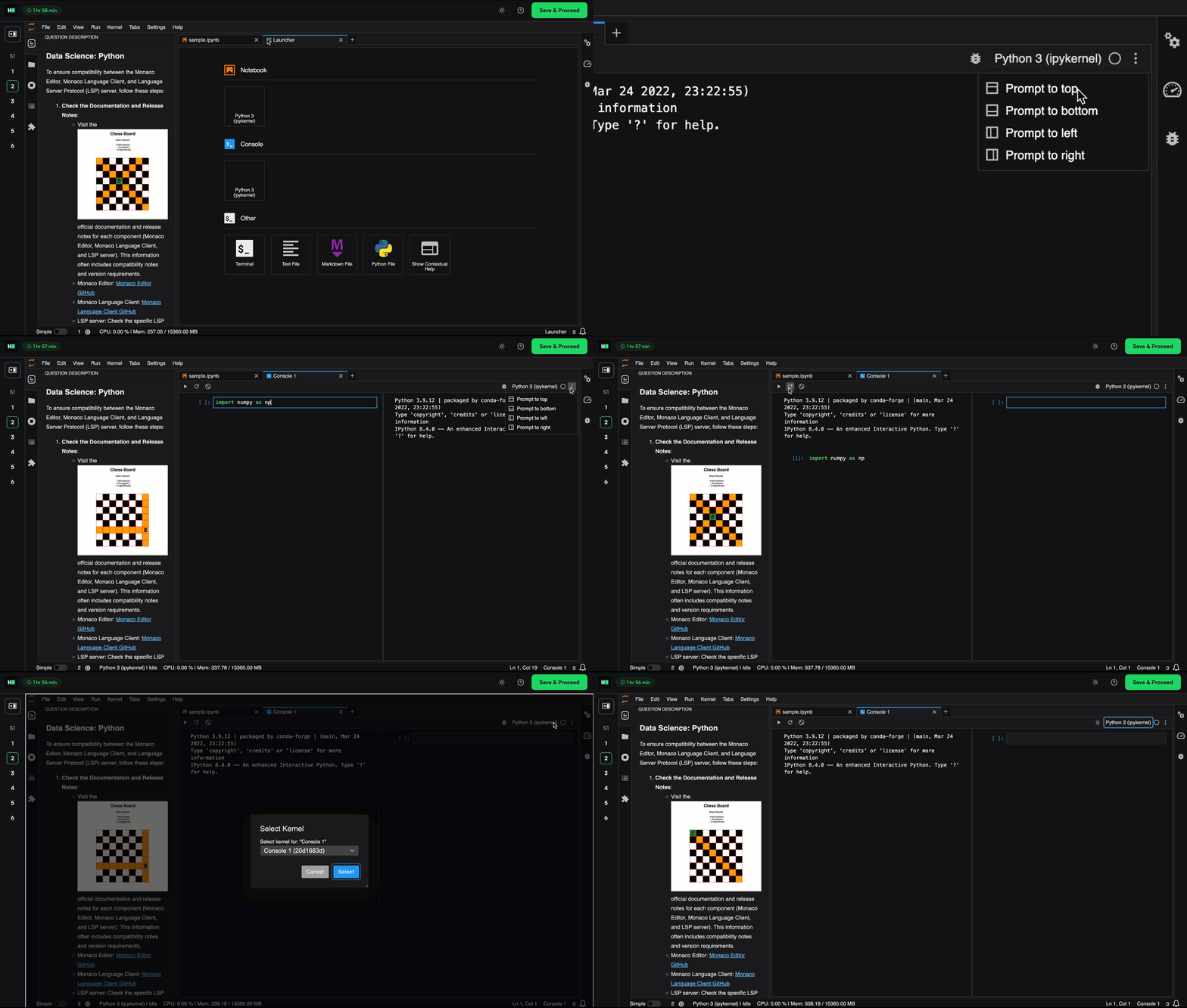
Custom Coding Console: Candidates can place the code prompt to the top, left, or right - not just the bottom. New toolbar buttons make it easier to run, restart, clear, and switch kernels. A single-cell scratchpad toggle helps focus when working step by step.
Cleaner User Interface: A slimmer status bar now hides idle terminal and kernel counters, reducing clutter and minimizing accidental taps on touch devices.
Improved Performance: Output rendering is quicker, with reduced lag when streaming or scrolling through large notebooks.
Higher Compute, When You Need It
As question complexity increases, especially with compute-heavy use cases like TensorFlow for Machine Learning and Data Science roles, we now support GPU-backed environments to ensure smooth execution and an optimal candidate experience, enabling you to assess skills more accurately without being constrained by platform limitations.
You can now request a free trial for GPU support by contacting support@hackerrank.com.
DevOps Assessment Improvements
DevOps Library questions now load up to 50% faster, cutting wait times from over four minutes to around two. Terminal lag has also been reduced, so the environment feels more responsive from the start.
Error-free Report Processing
Candidate report processing is now more reliable, helping minimize delays in receiving evaluation results. We've made major improvements to reduce report processing errors by 93% bringing it to under 0.2%. This ensures a smoother, more dependable assessment experience, helping you access timely insights to evaluate performance and make confident hiring decisions.
Platform Upgrades
The HackerRank platform now runs on the latest versions of today’s most-used languages and frameworks, so you can assess developers in environments that reflect real-world engineering stacks
These upgrades help ensure compatibility, improve performance, and give candidates a great experience.
Environment | Current Version | Upgraded Version |
Interview
Improvements to Whiteboard Experience
We’ve introduced a series of whiteboard improvements to make editing, working with shapes, and copy-pasting faster and more intuitive.
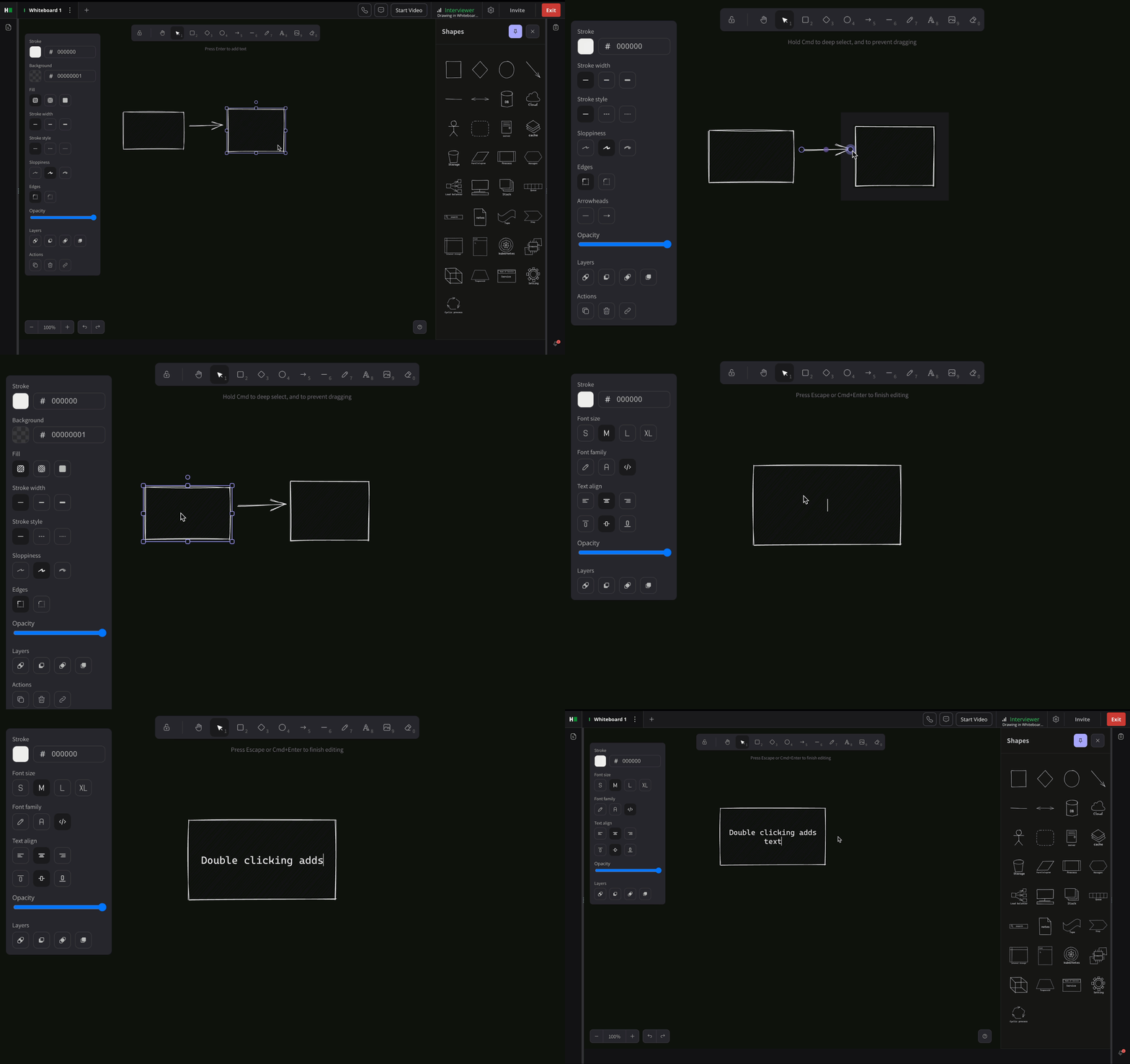
Intuitive Text Editing: Resize and wrap textboxes, even after pasting, so you can focus on content, not formatting. You can now double-click a shape to add text directly inside, without needing a separate text box.
Easier Shape Adjustments: Anchors now appear on hover for custom shapes, making it simpler to position and align elements.
Consistent Styling Across Shapes: Shapes added from the right panel now retain your selected color and stroke settings automatically.
Sticky Scroll: When switching tabs, your view stays precisely where you left it.
Improved Copy-Paste: Images copied from Google Docs now paste cleanly onto the whiteboard—no extra steps required.
Interview Scorecard PDFs for Workday and Greenhouse
Hiring teams can now view secure, authenticated PDF versions of HackerRank scorecards directly within candidate profiles in Greenhouse and Workday. This makes it easier for teams, especially those who don’t log into HackerRank, to review feedback without delays or workarounds. With evaluations available right where you work, hiring decisions become faster, clearer, and more collaborative.
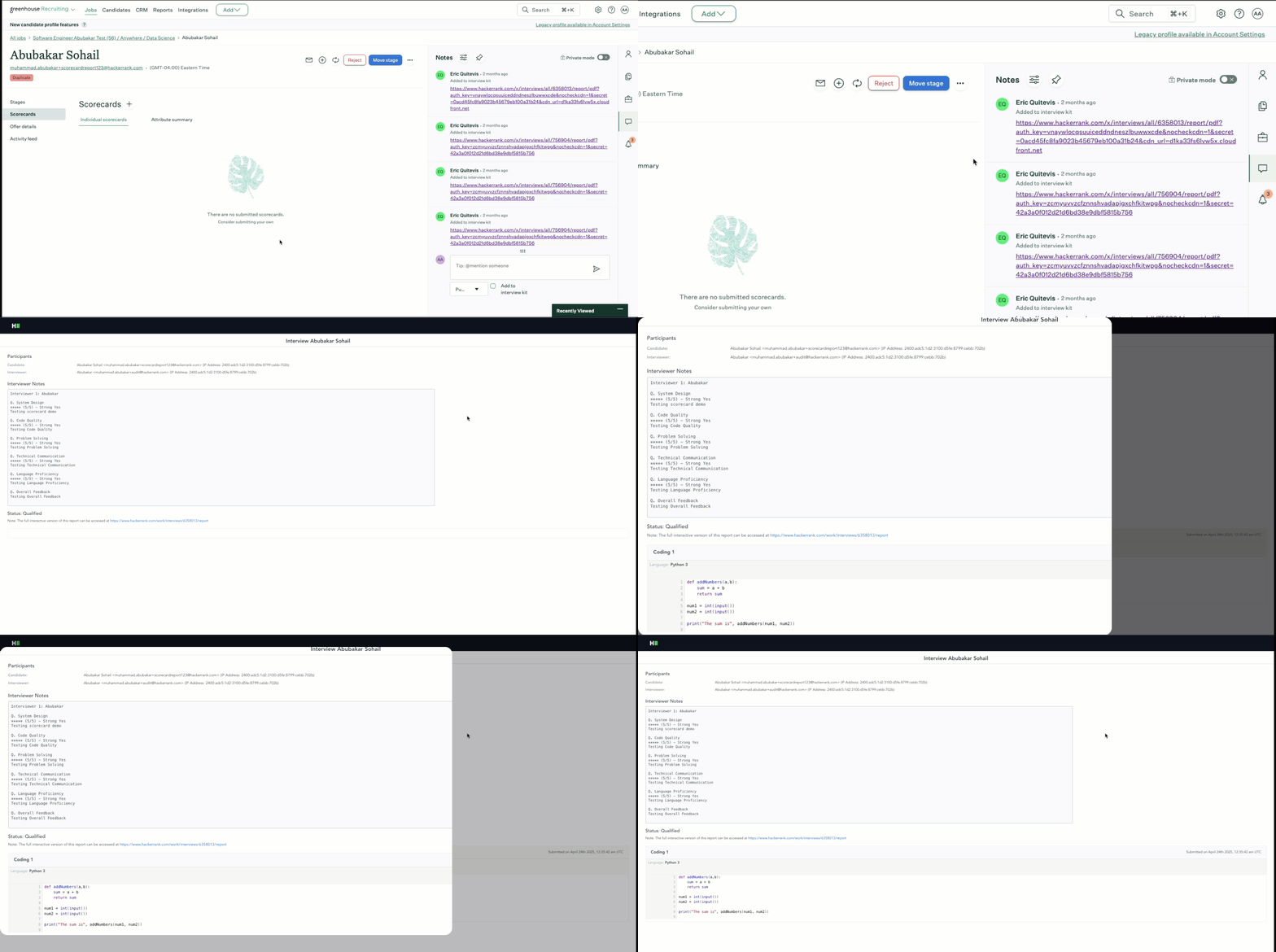
For more information, see View Interview Scorecard on Greenhouse.
Status Indicator in the Report Page
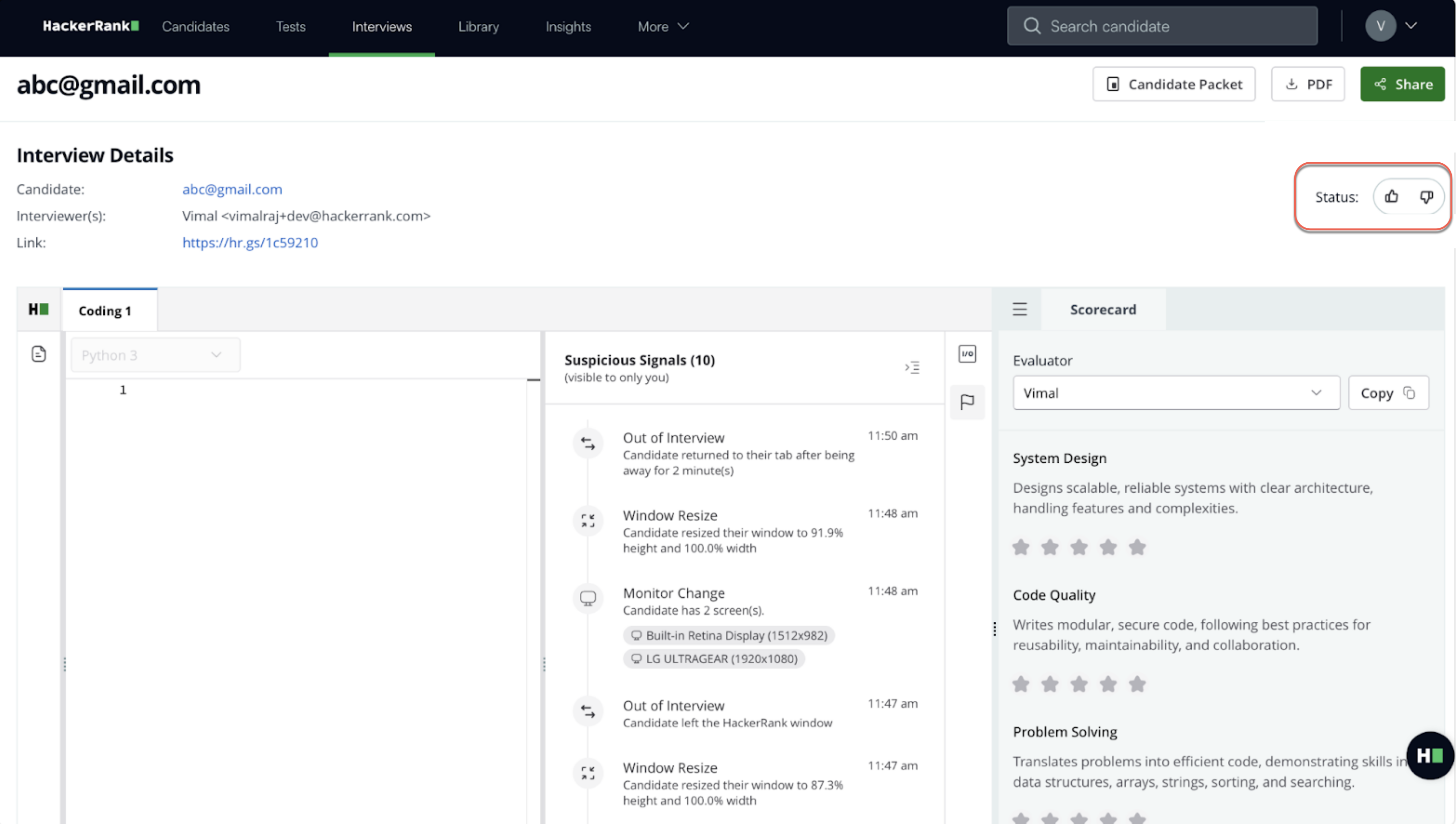
The thumbs-up/down status indicators on the interview page are now removed. This ensures that “Qualified” or “Failed” labels do not appear on the timeline, creating a more neutral, consistent experience for both candidates and interviewers.
Improvements to Performance
Interviews now load significantly faster, improving the experience for both candidates and interviewers. Coding questions open 37% faster, and Whiteboard questions load 26% quicker. By reducing redirects, eliminating unnecessary loading checks, and parallelizing API calls, we’ve cut down wait times across the board, helping candidates get started quicker and interviewers stay on schedule.
Improvements to Integrity Signals
Interview integrity is now more contextual and focused. Instead of flagging isolated actions like tab switches or pastes, the system looks for patterns of behavior, grouping signals and classifying them as silent, grouped, or critical. You’ll only be alerted when multiple actions suggest a genuine concern, reducing unnecessary noise.
A new real-time status widget gives you live visibility into candidate focus, screen sharing, and monitoring setup. This helps you interpret behavior in the proper context and respond appropriately.
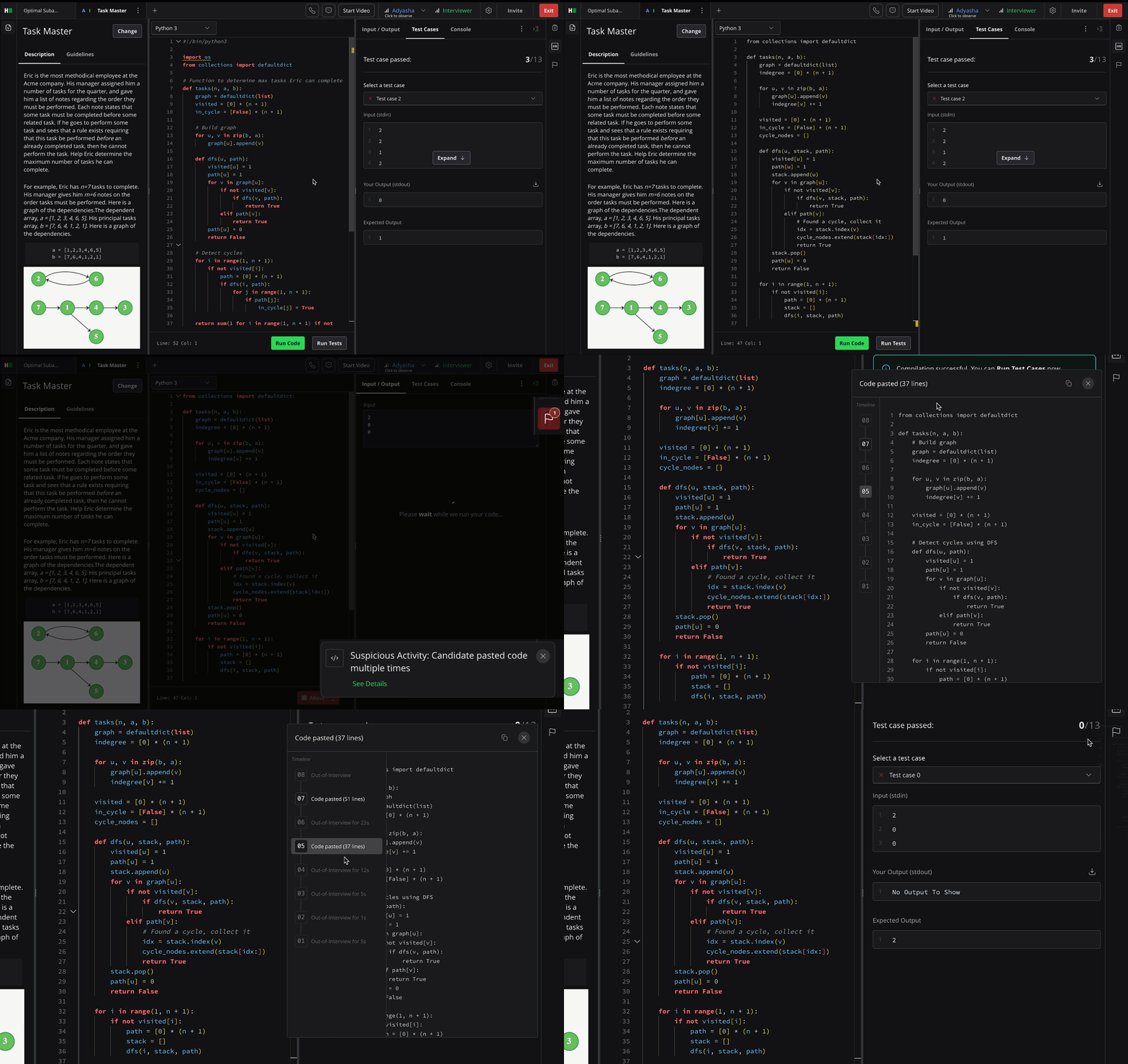
For more information, see 📄 Interview Integrity Signals.
Interview Features Available in the AI Add-on Package
The AI Add-on package includes advanced features that help you assess next-gen skills and maintain interview integrity in an AI-native world. It’s built to solve emerging challenges with the right level of depth and control. For more details, contact your account manager or email support@hackerrank.com.
Screen to Interview Identity Match
Ensure that the candidate who took the screening test is the same person attending the interview - without adding friction to the process.
Candidate images are automatically captured during both stages and matched using facial recognition. If the similarity score falls below a predefined threshold, a real-time alert is triggered, giving you a chance to act without disrupting the session.

For more information, see 📄 Screen-to-Interview Identity Match.
Interview Transcription
Real-time transcription now provides a lightweight, searchable record of each conversation, so hiring teams can focus on meaningful evaluation instead of manually taking notes. Powered by Zoom’s SDK, transcripts capture all audio interactions and are easily accessible via email, reports, or API. You also have complete control over transcription settings to match your workflow and privacy preferences, making it simple to revisit and review what matters most.
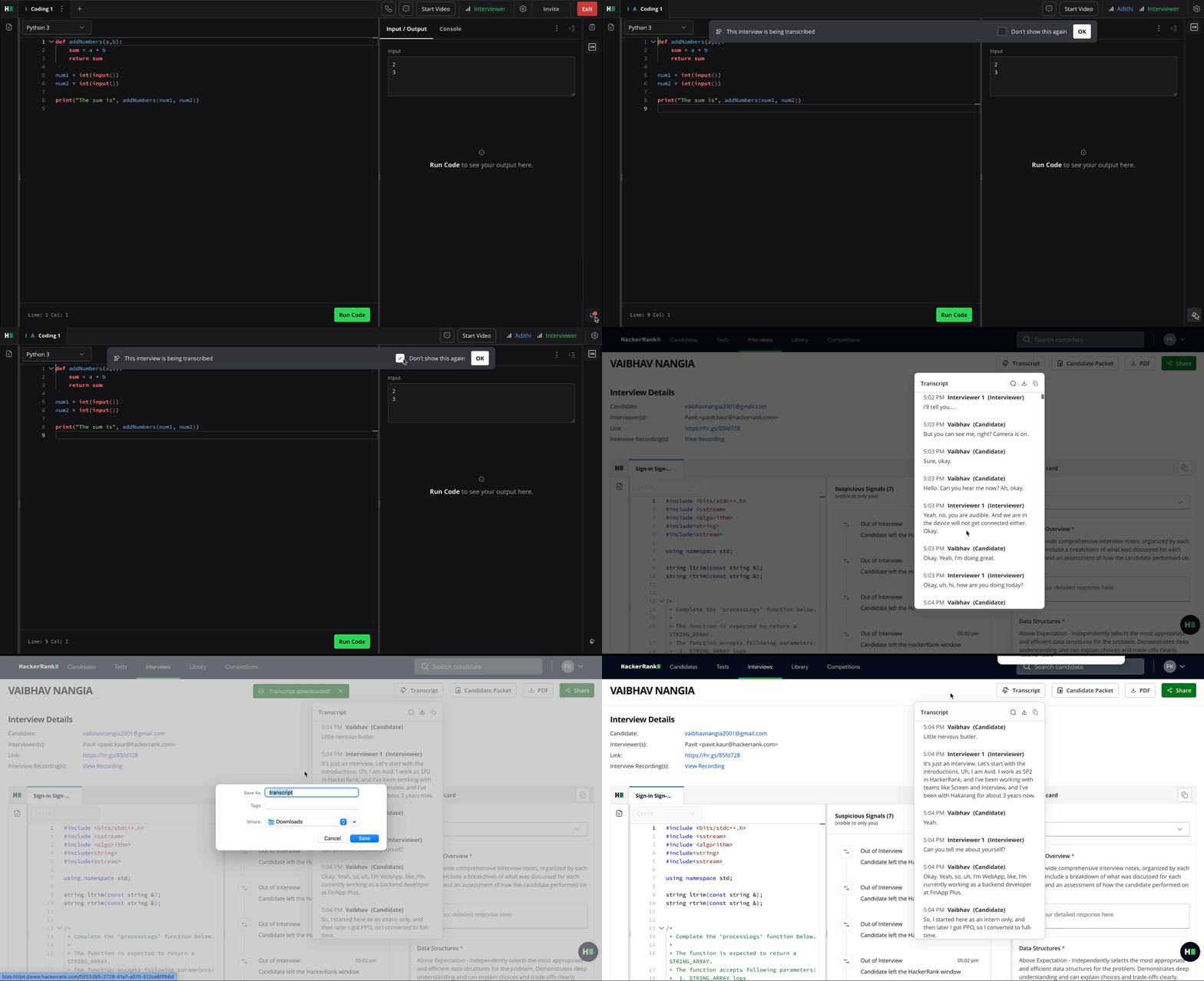
For more information, see 📄 Scorecard Assist.
Scorecard Assist for Coding Questions
A new auto-generated scorecard simplifies post-interview evaluation for hiring teams. Once an interviewer selects “Leave Interview” or “End Interview,” the platform automatically generates a pre-filled scorecard using data from the session, including the transcript, code submissions, timestamps, test case results, and the assigned rubric, resulting in faster, more structured evaluations that help teams make decisions.
Pre-requisite: Interview transcription needs to be enabled before enabling Scorecard Assist.
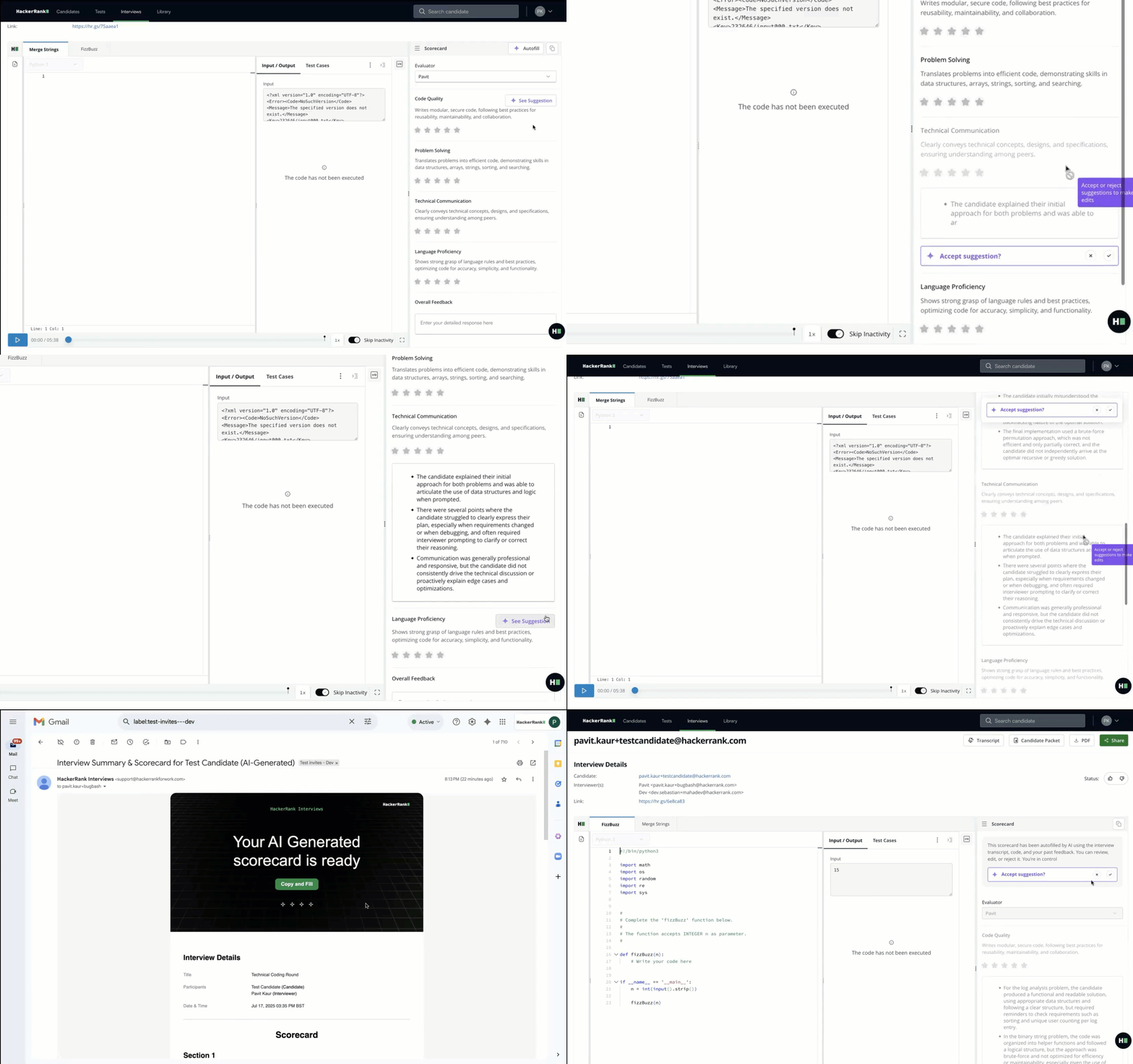
For more information, see 📄 Scorecard Assist.
AI-Assisted Interviews
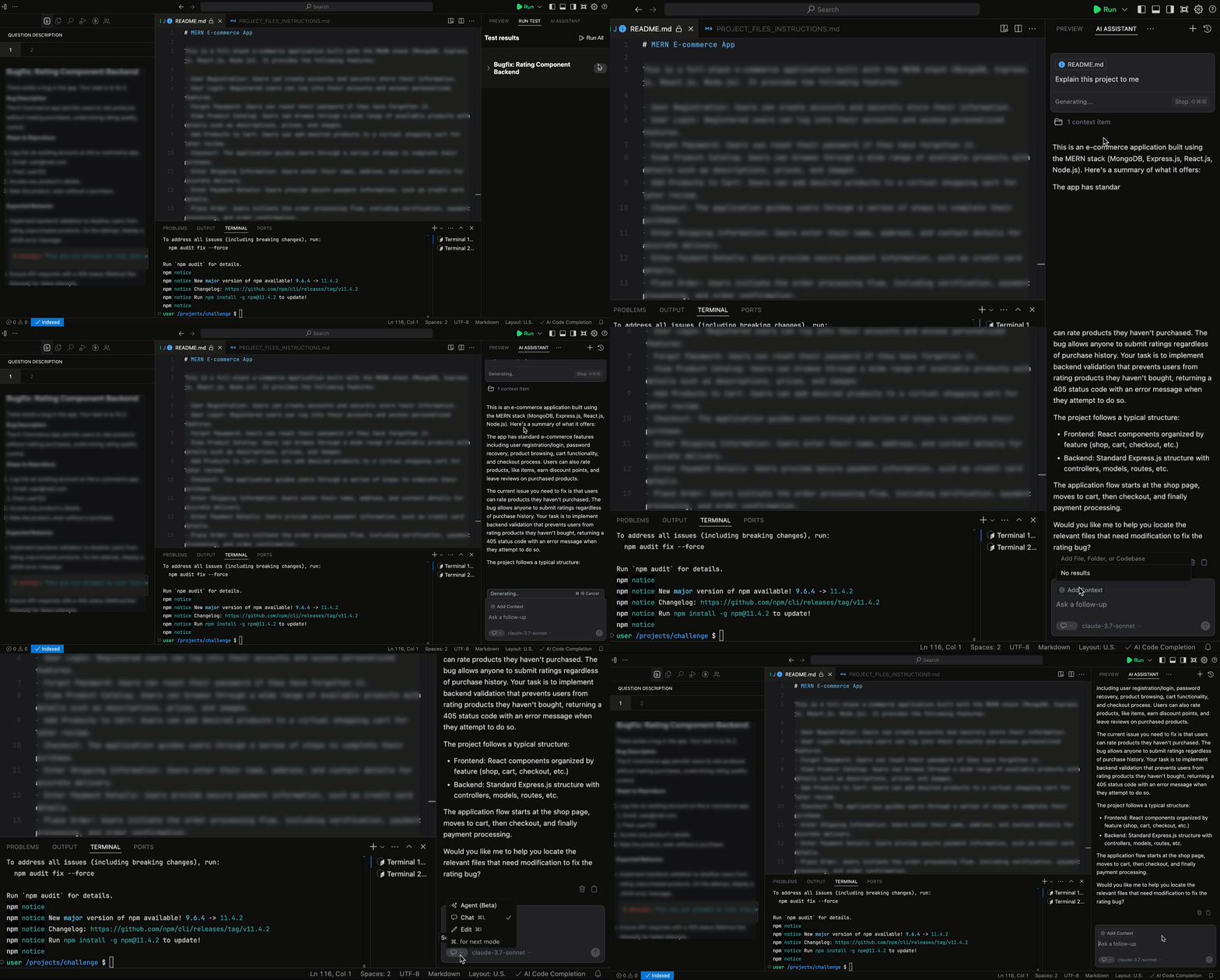
In interviews, you can turn on unguarded mode, where the AI Assistant offers more open-ended help, especially useful during pair programming rounds. Whether candidates are reviewing code, fixing a bug, or navigating a new file, the interview experience now feels more natural and closer to everyday software development.
Key Capabilities:
Chat: AI can explain code, clarify questions, and write code.
AI Autocomplete: Candidates receive inline and multi-line code completions to accelerate development.
Agent Mode: Autonomously navigates your codebase, edits multiple files, runs commands, and fixes errors to complete tasks, functioning as an AI pair-programmer.
AI Assistant supports Frontend, Backend, Mobile, Full-Stack, and Code Repo question types.
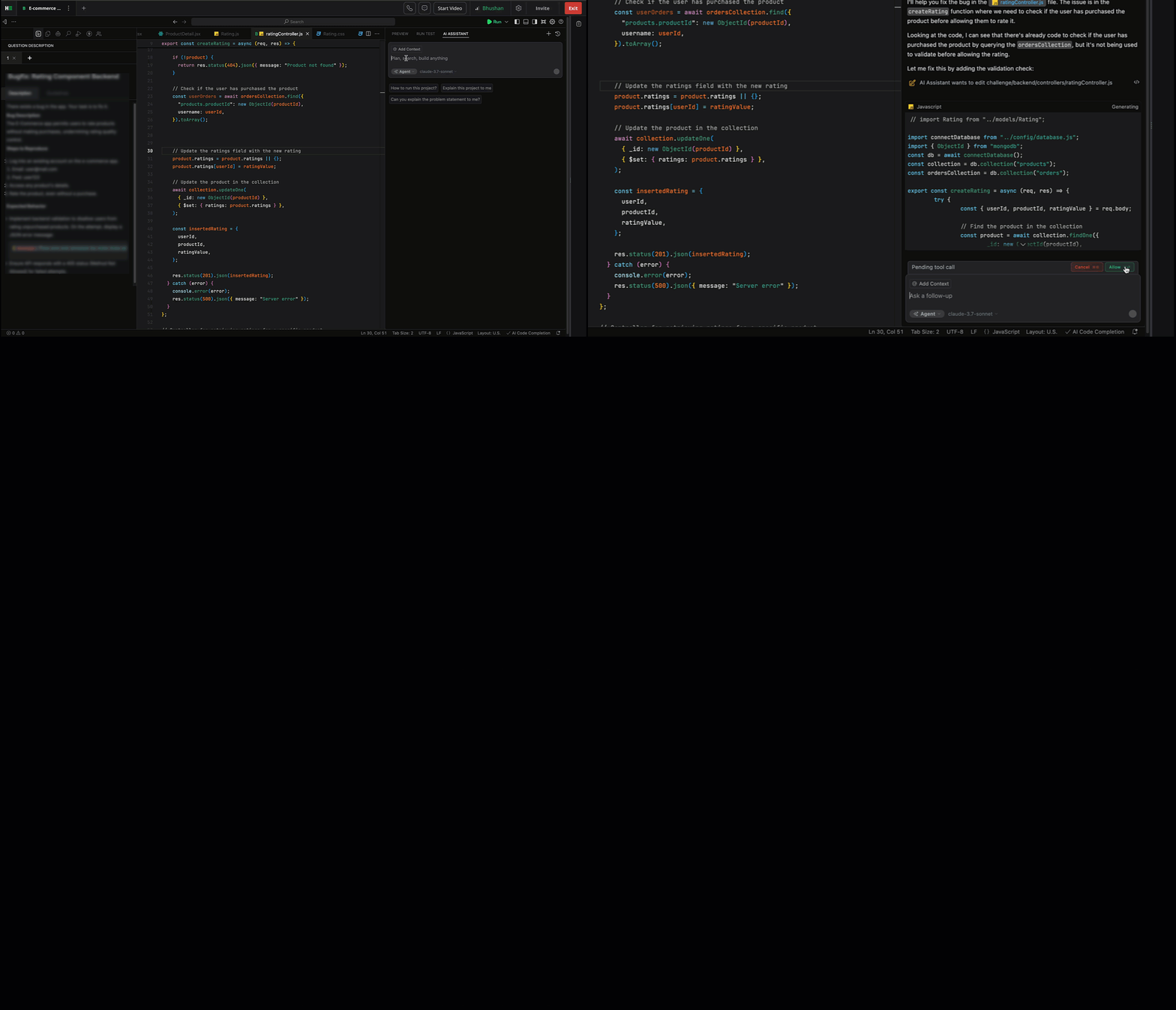
For more information, see 📄 AI-Assisted Interviews.
SkillUp
New Learn Tracks for GenAI Skills
AI is changing how software gets built, and your teams are looking to become Next-gen developers. With SkillUp, developers learn to think and build with AI: when to use it, how to guide it, and how to stay unblocked while maintaining quality. New AI-tutor-led tracks on Prompt Engineering, RAG, and Agent Building help your teams master these new skills.
For more information, see Roles and Skills in SkillUp.
RAG
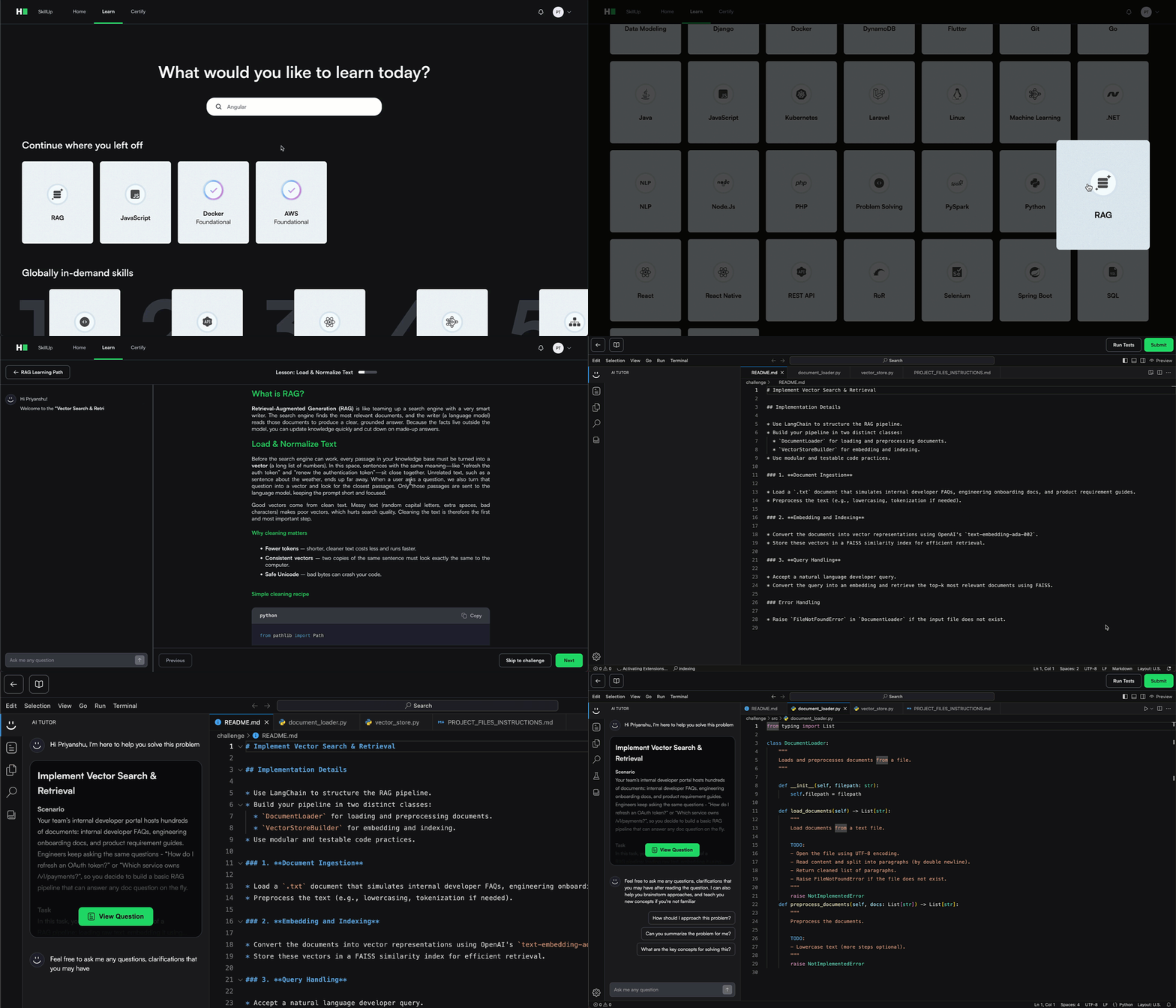
You can now learn to build Retrieval-Augmented Generation (RAG) pipelines with hands-on support from an AI tutor - one focused concept at a time.
RAG Fundamentals: Understand how retrieval, vector indexing, and generation work together in modern AI pipelines. Learn to troubleshoot each part with real-world examples.
Use Real Developer Tools: Work in a modern dev environment with terminal access, test harnesses, temporary dataset storage, and AI guidance at every step.
Build as You Go: Each module combines concept walkthroughs (with diagrams and Q&A) followed by hands-on coding tasks where you complete or debug parts of a working RAG pipeline.
Prompt Engineering
Master the skill of writing clear, effective prompts that generate better AI outputs, with hands-on guidance from an AI tutor.
Prompting Fundamentals: Understand what makes a good prompt and why it matters. Explore examples with your AI tutor, ask questions, and experiment in a guided sandbox before tackling real tasks.
Use Real Developer Tools: Write and test prompts in an LLM-integrated editor with built-in evaluation and prompt logging. The AI tutor offers step-by-step support to help you improve as you go.
Build as You Go: Each module includes challenges that focus on code-based and non-code-based prompting, complete with test cases to evaluate your outputs.

Agent Building
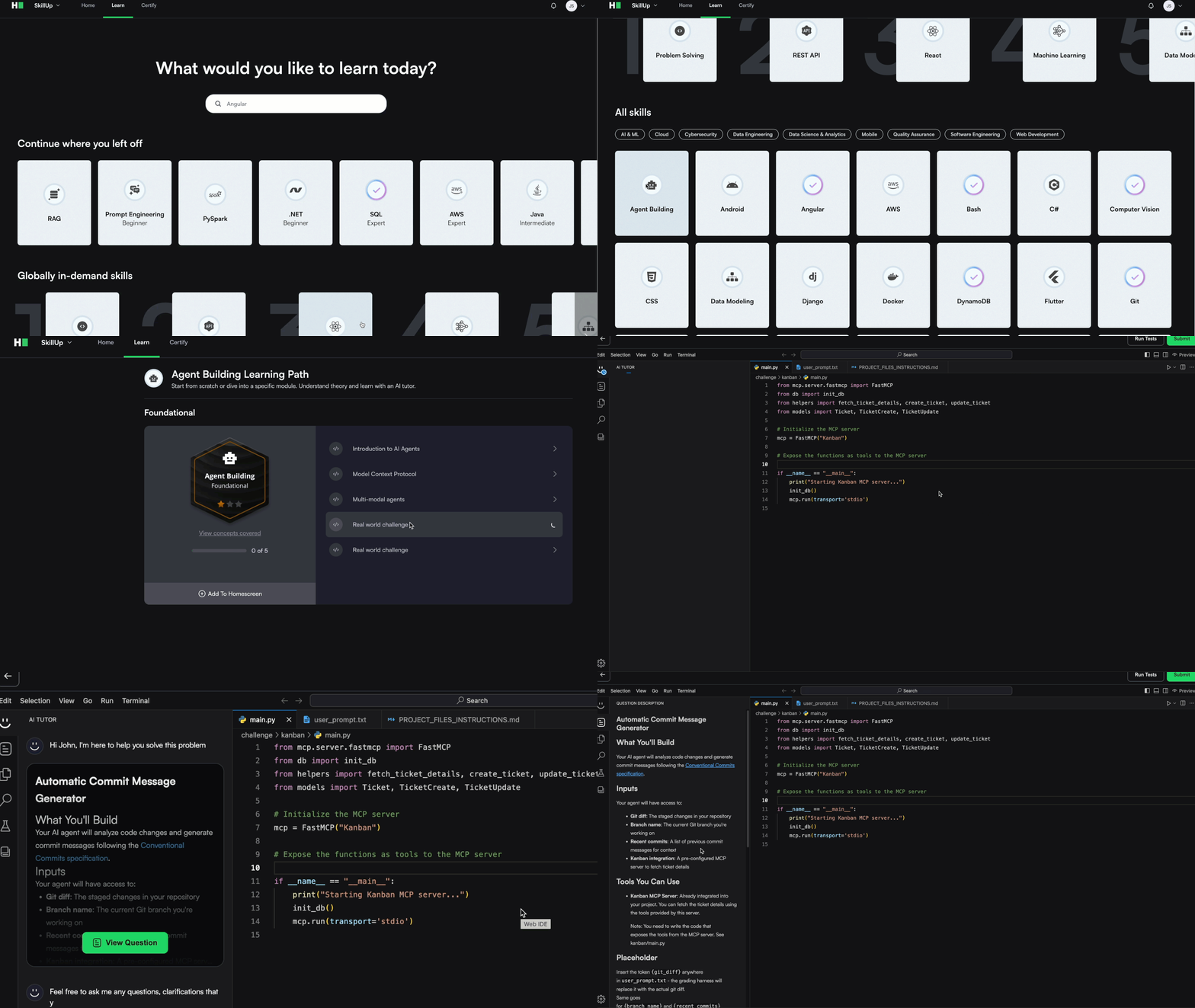
Get started with AI agents by building foundational skills that reflect how modern developers integrate LLMs into real workflows.
Agent Fundamentals: Understand how stateless agents work using the ReAct pattern, combining reasoning with tool use. Learn how LLMs invoke tools and APIs to perform simple, well-scoped tasks.
Build Practical Agents: Work on real-world challenges like creating a commit message generator or a lightweight Python agent from scratch, without relying on libraries or frameworks.
Guided Learning: An AI tutor helps explain key concepts like the thought-action-observation loop, narrow tool use, and the basics of LLM integration, giving you a strong foundation for more advanced agentic systems
Custom Certifications
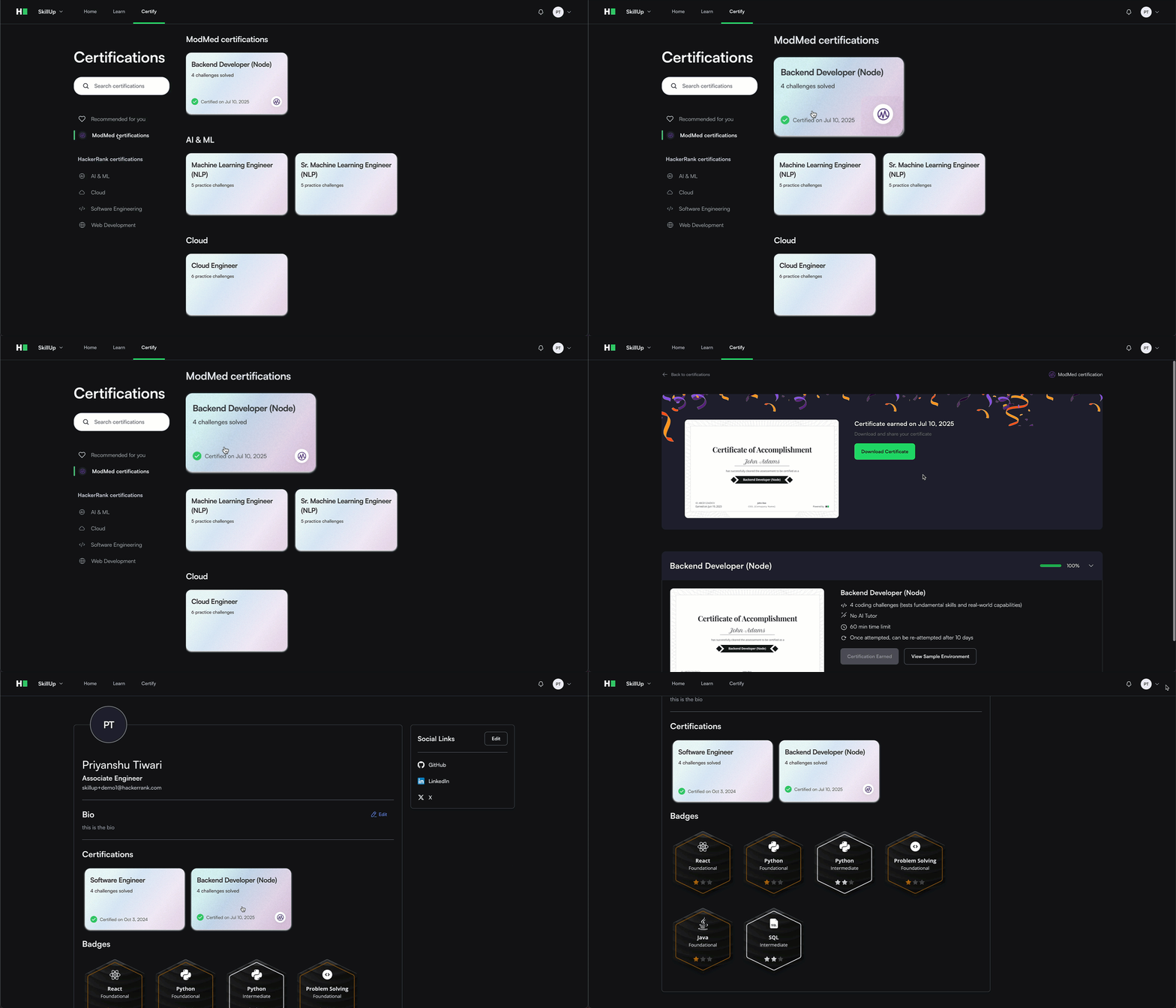
You can now convert a custom test built in HackerRank Screen into a certification in SkillUp. These certifications work just like our standard ones, with progress tracking and clear custom labels to distinguish them. Admins can build and manage assessments in HackerRank, while developers earn certifications through SkillUp’s guided experience. This gives you the flexibility to test the skills that matter most to your organization, while benefiting from SkillUp’s integrated learning paths, practice tracks, and reporting tools.
For more information, see 📄 Custom Certifications.
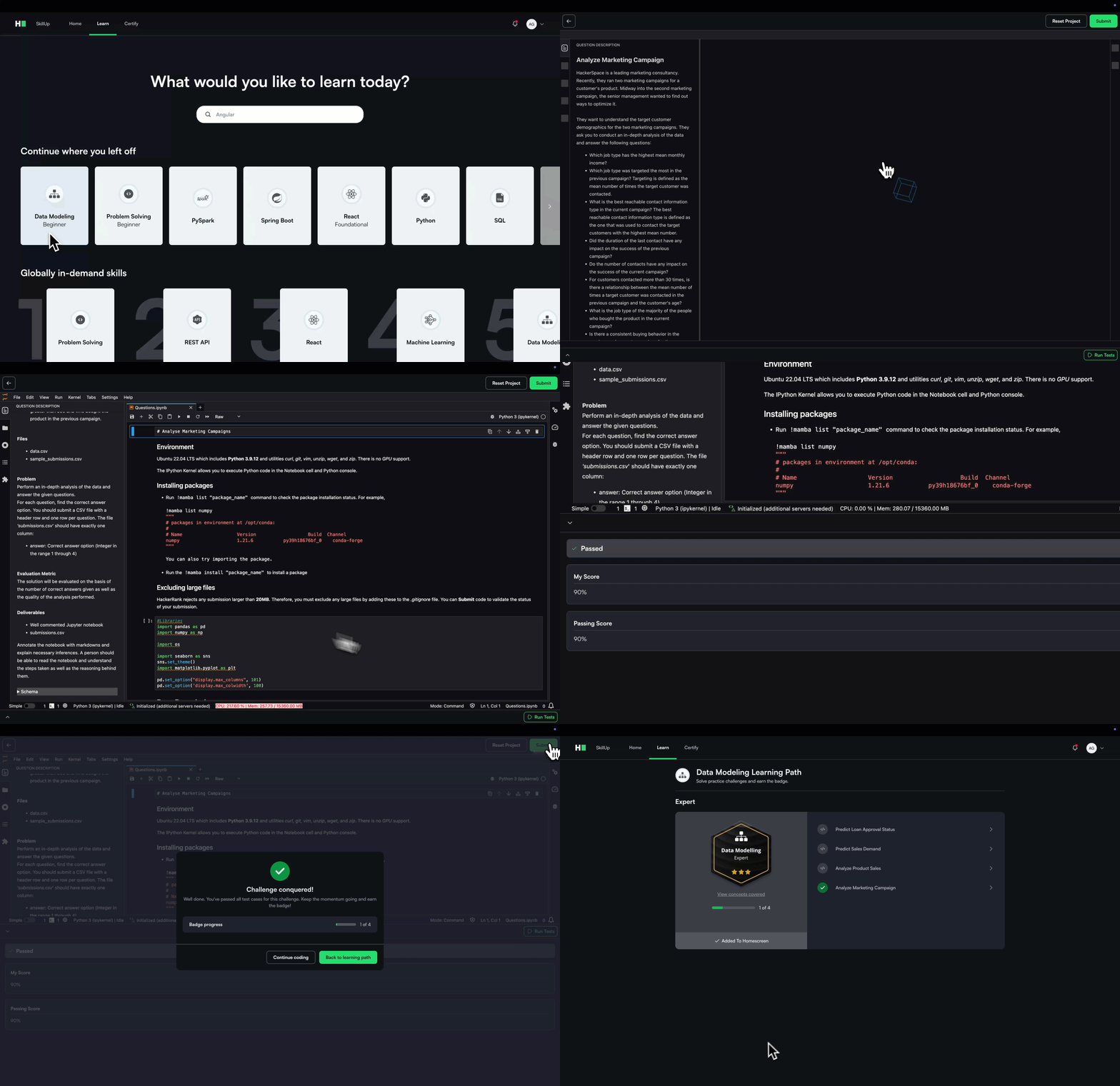
In-line Integration for Terminal and Jupyter Notebook
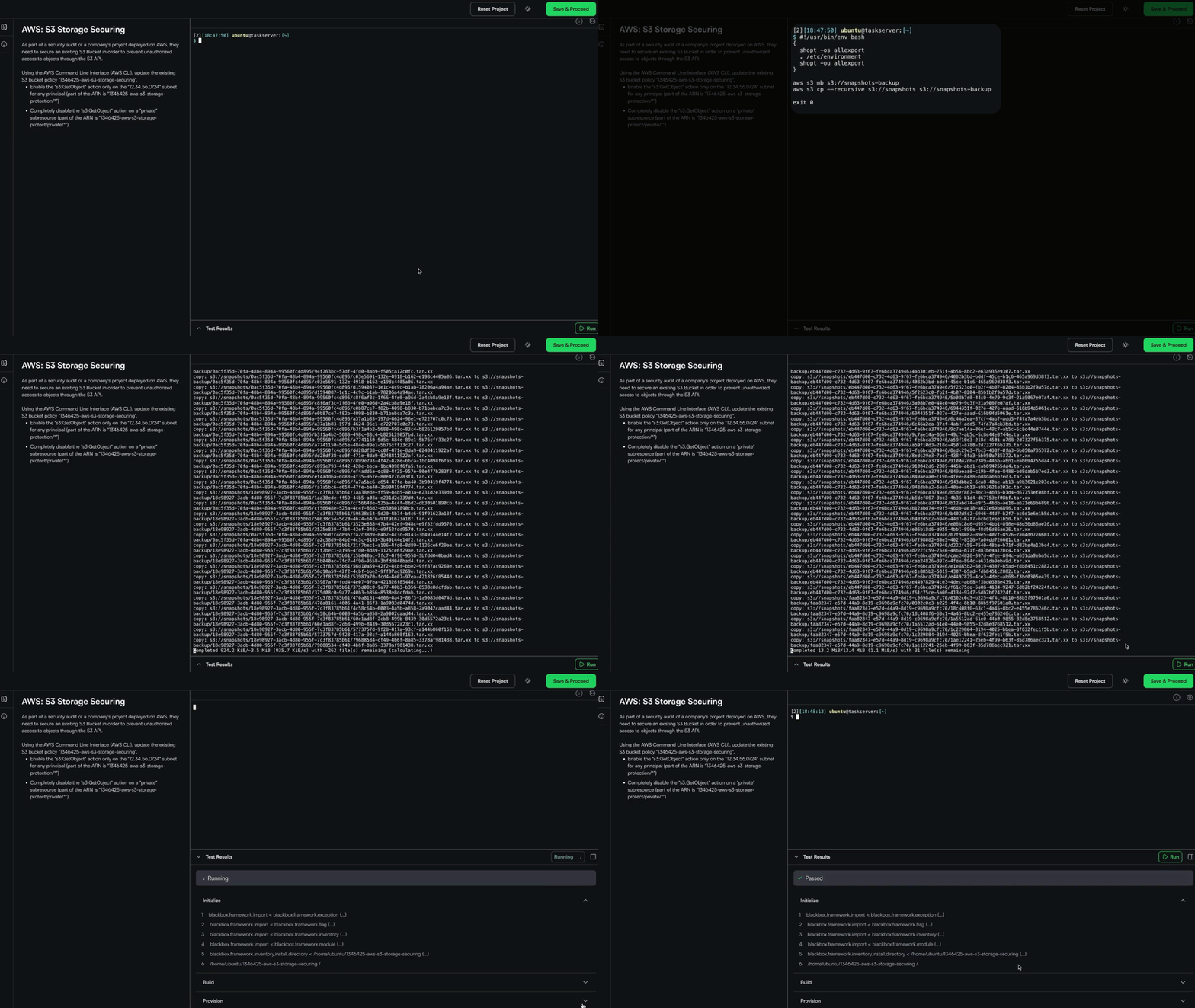
You can now execute terminal commands and Jupyter notebooks directly within SkillUp’s Learn and Practice tracks, making it easier to complete DevOps and Data Science tasks without switching contexts and being redirected to an HRW test. Everything runs in one seamless, integrated workflow.
Engage
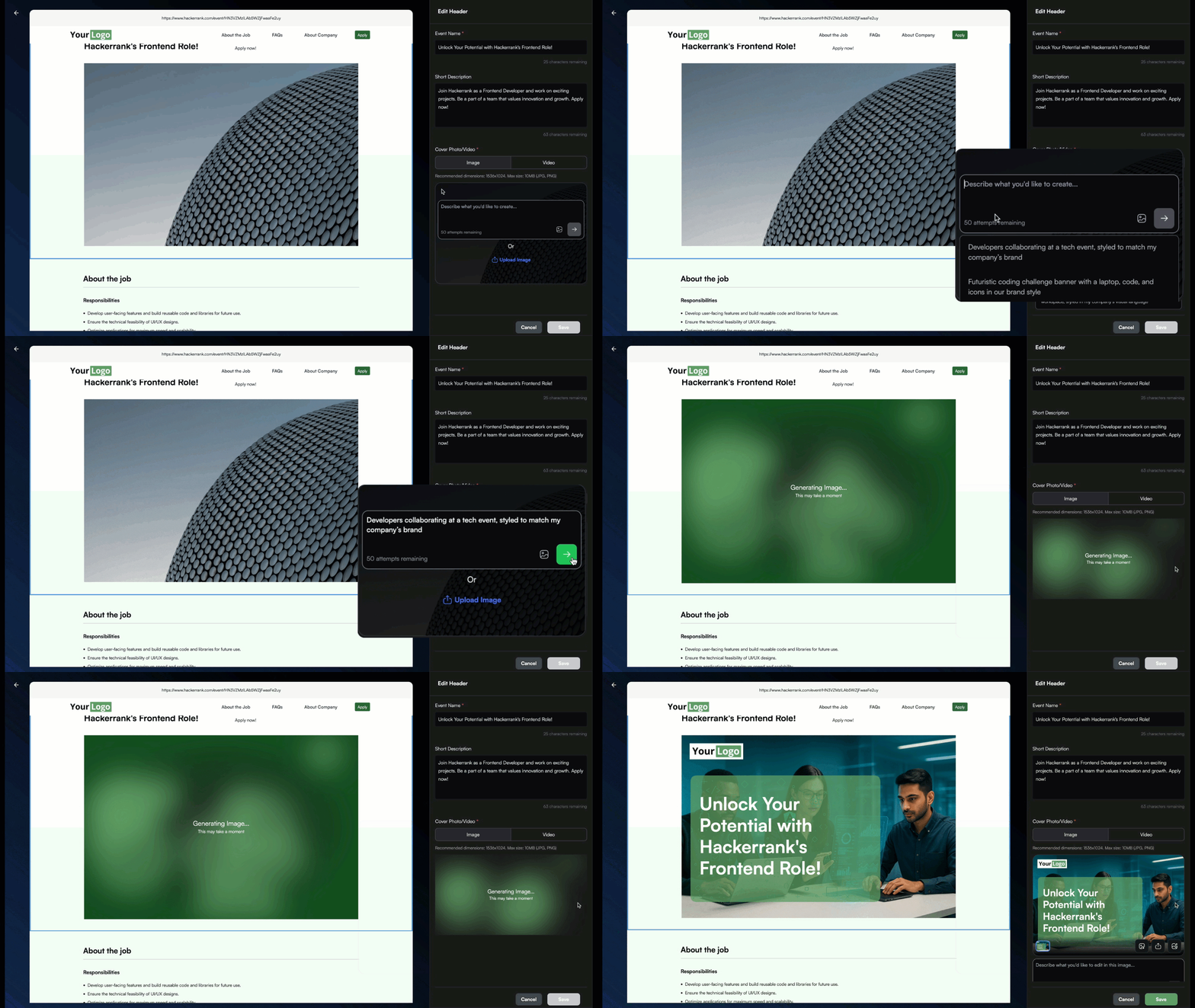
Generate Banner Images using AI
You can now generate a professional banner image for your event in seconds using AI. Enter a description of your desired image using the starter prompts provided for guidance. The system will create a custom banner featuring your event name. Regenerate the banner image up to five times to view alternative variations and select the version that best aligns with your event’s visual identity.
For more information, see Update content layout.
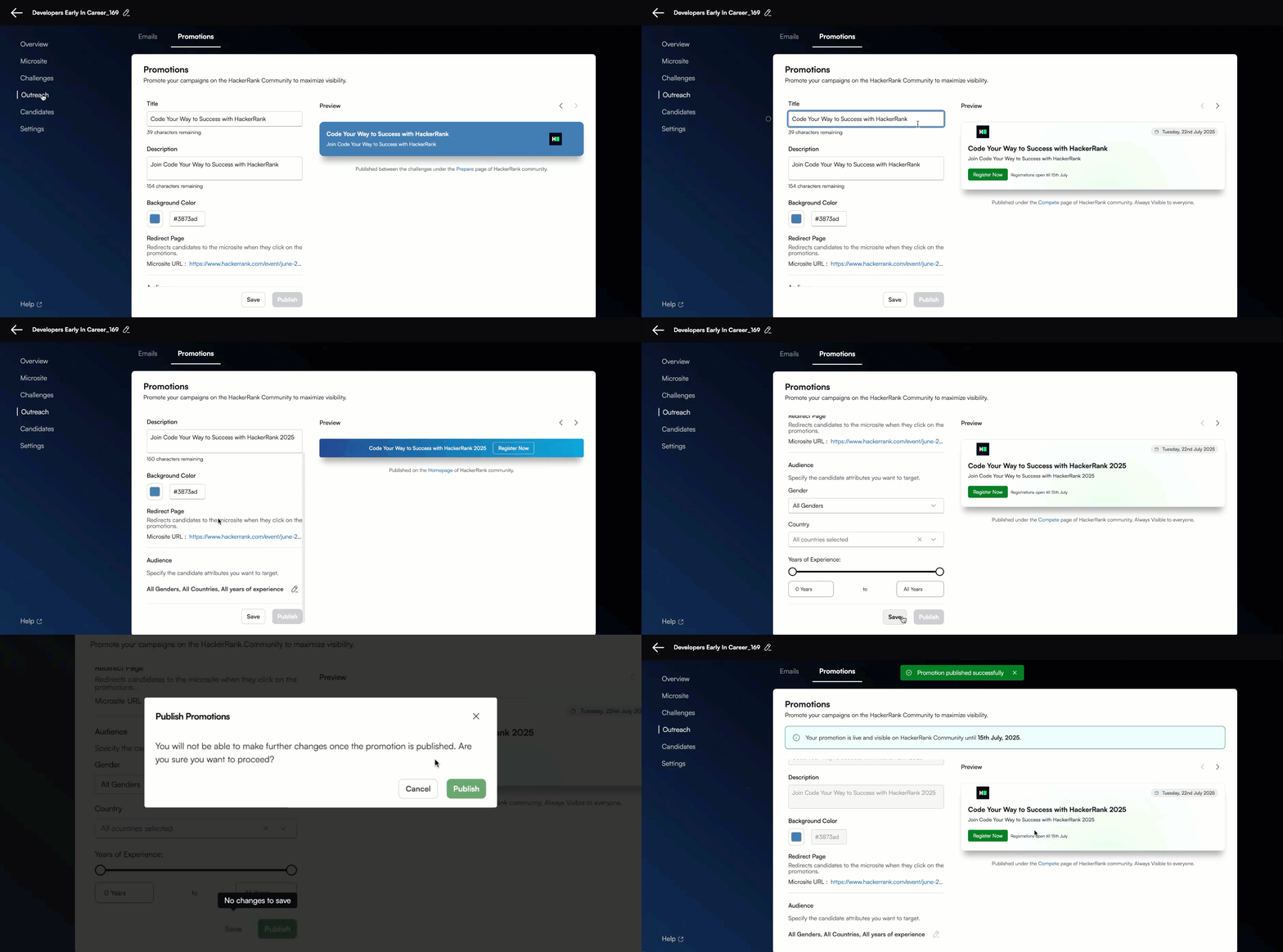
Auto-Publish Ads on HackerRank Community
Your events deserve the right audience. With this update, you can promote them directly to millions of developers on the HackerRank Community, all from within Engage. Simply add your event details under the ‘Promotions’ tab and publish when ready. Your ad goes live instantly, helping you drive registrations without delays.
For more information, see Set up your promotion.
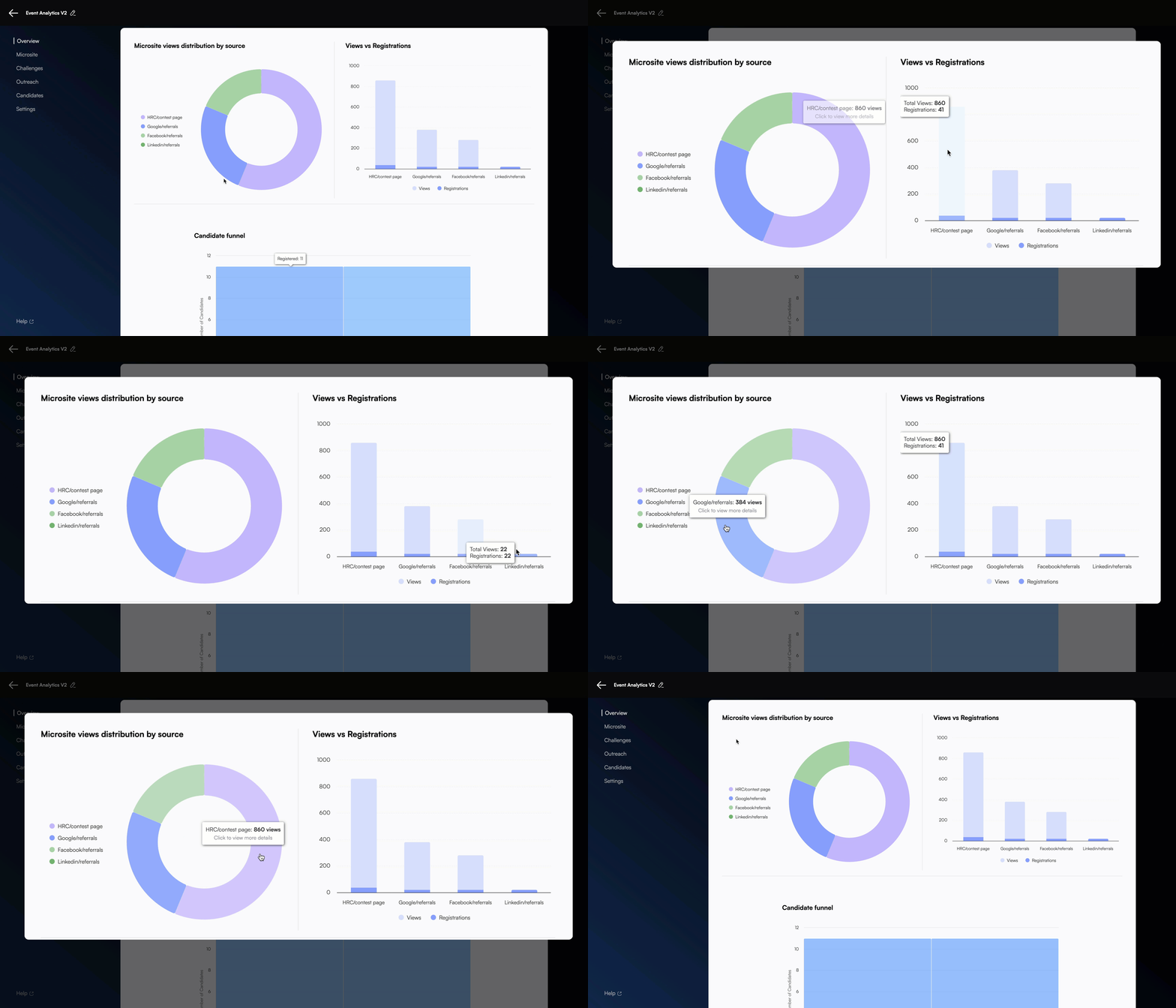
Registration Insights on Home Page
Tracking the ROI of your marketing channels is now simpler. The new ‘Views vs. Registrations’ graph on your event’s Overview page shows exactly how each channel contributes to your registrations. Use these insights to optimize your marketing strategy and focus your efforts where they drive the most impact.
For more information, see View marketing insights.
Enhancements to Email Sequence Experience
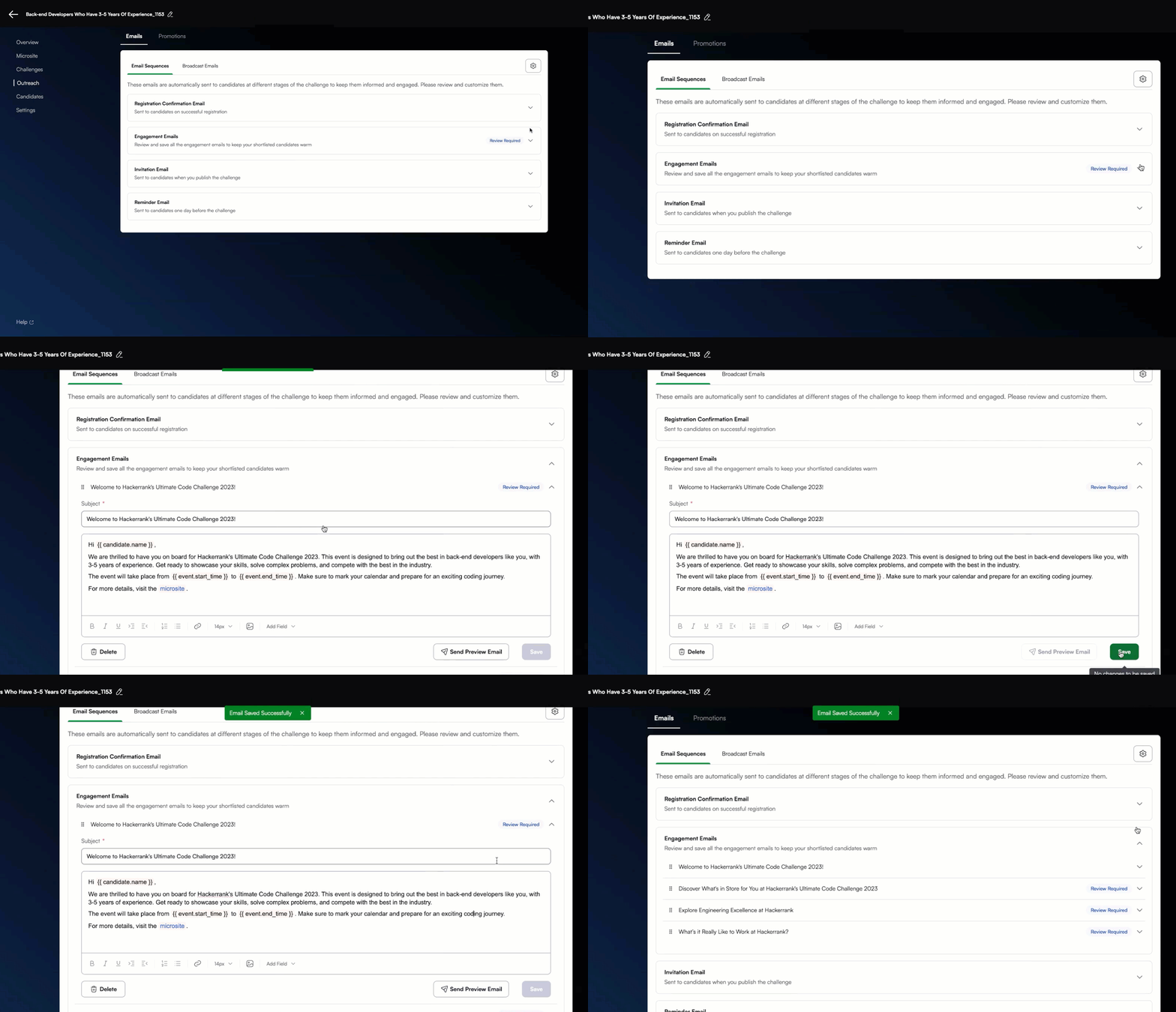
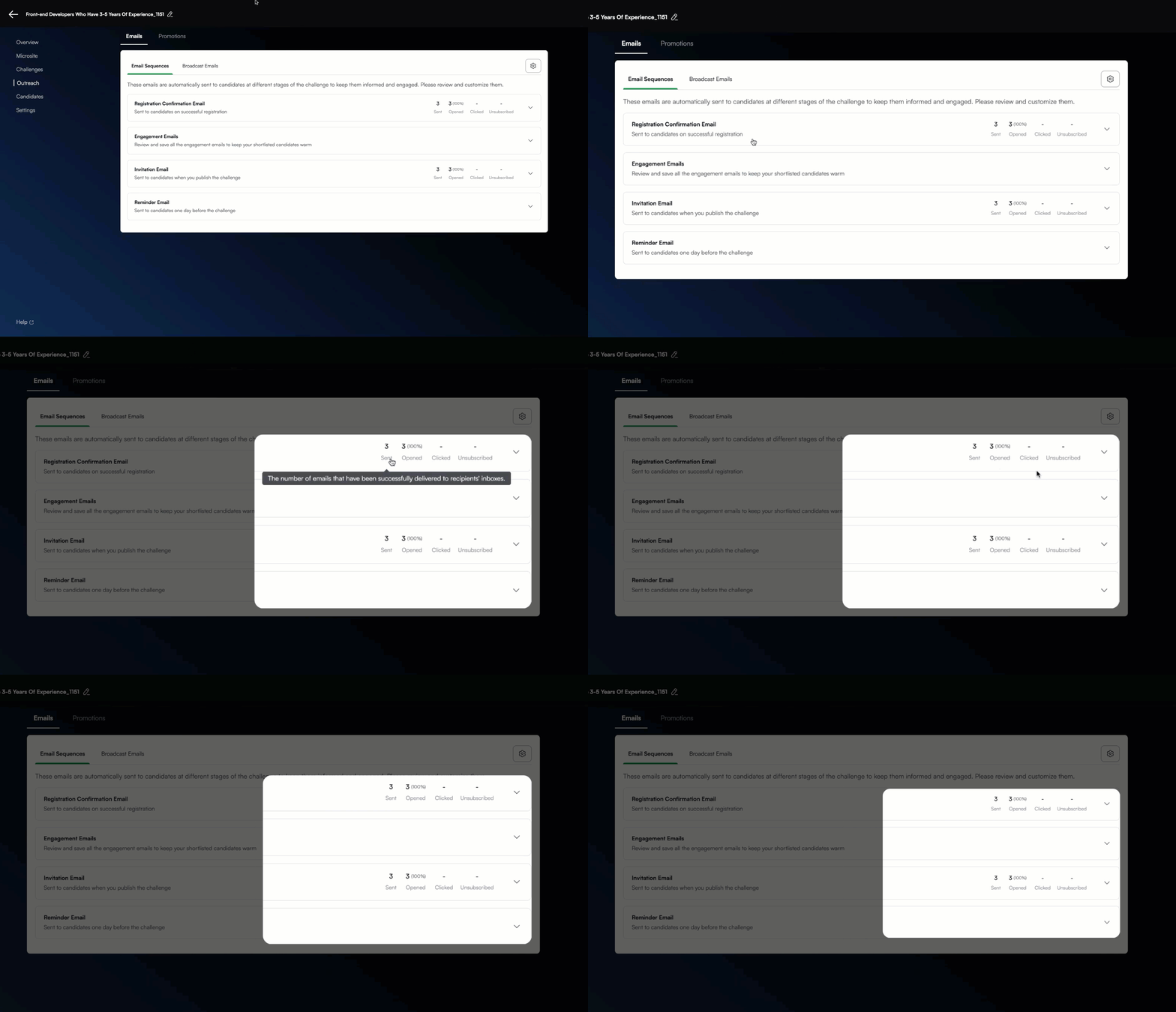
No more jumping between tabs to track your event emails. All candidate communications—registration confirmations, invitations, reminders, and engagement emails—are now organized under the new ‘Email Sequence’ tab in the ‘Outreach’ menu. Review and edit every message easily from a single, streamlined view.
For more information, see Set up email sequences.
Thank you for supporting our mission to change the world to value skills over pedigree. Your feedback continues to drive our innovations forward. If you have questions or need assistance, email support@hackerrank.com or contact your account manager.