Custom Checker for Approximate Solution Questions
Last updated: July 9, 2026
A custom checker evaluates a candidate submission by using your validation logic instead of relying only on exact output matching.
You can use a custom checker when:
Multiple valid answers are possible.
Output formatting can vary.
Answers can be approximate, such as when you allow numerical tolerance.
You want to assign partial credit.
You need domain-specific validation rules.
How a custom checker works
When you use a custom checker, HackerRank evaluates submissions at the test case level.
For each test case:
The platform runs the candidate’s code.
The platform passes the generated output to the custom checker.
The custom checker applies your scoring logic.
The custom checker returns a result, score, and message for the test case.
To add a custom checker to an approximate solution question, see Step 5: Custom Checker.
Custom checker structure
The custom checker contains three sections:
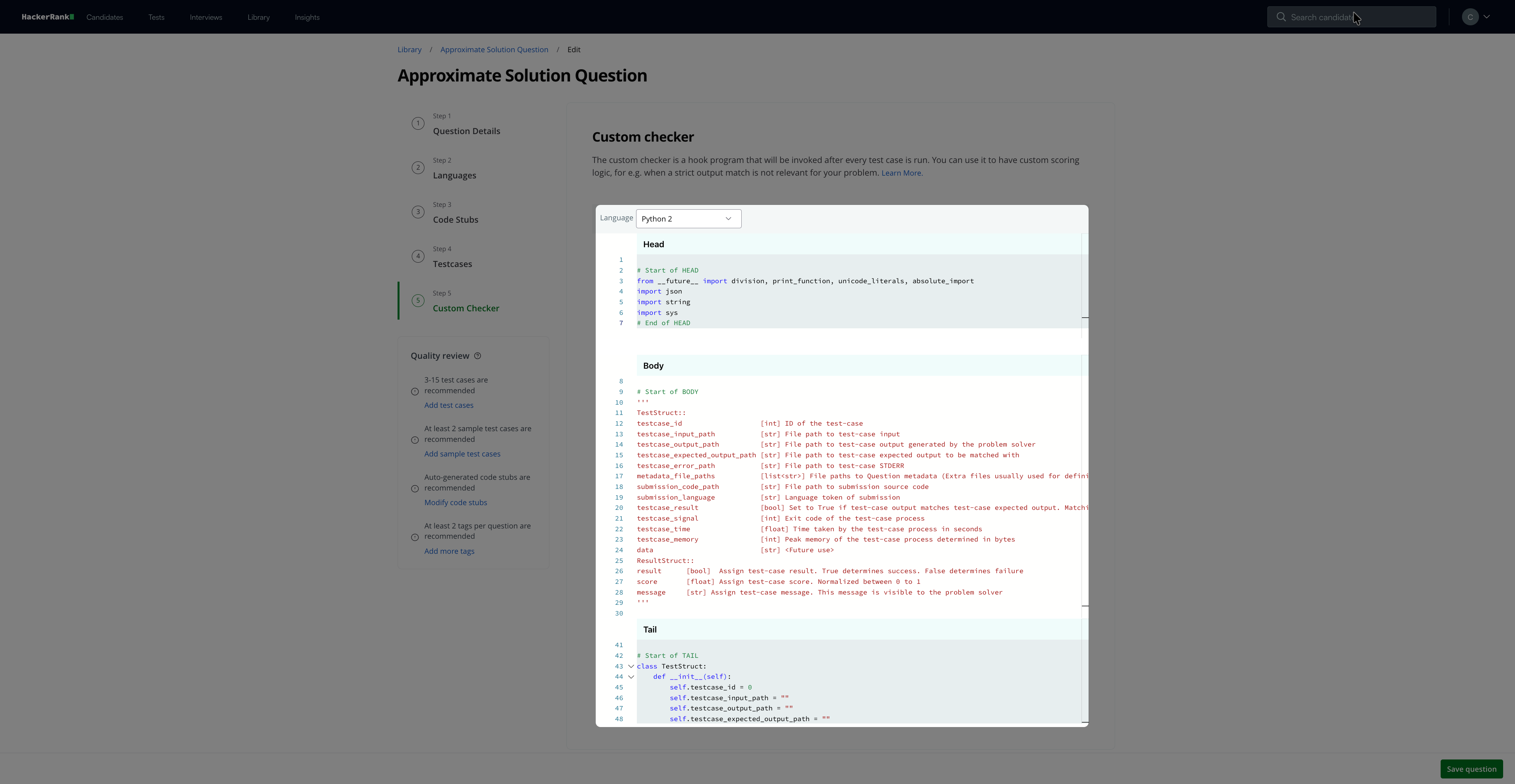
Head section (non-editable)
Body section (editable)
Tail section (non-editable)
You can write your validation logic in the body section.
The checker body must define the following method:
run_custom_checker (TestStructure t_obj, ResultStructure r_obj)Note: Do not print anything to STDOUT inside run_custom_checker(), as it can interfere with the evaluation process.
TestStructure object
The TestStructure object provides access to test case data and execution details.
Field | Type | Description |
| Integer | ID of the test case |
| String | Path to the test case input file |
| String | Path to the candidate-generated output file |
| String | Path to the expected output file that the system uses to compare against the candidate’s output. |
| List of strings | Paths to metadata files (for example, training datasets) |
| String | Path to the candidate’s source code |
| Boolean | Indicates whether the candidate’s output matches the expected output. The system performs a line-by-line comparison. |
| Integer | Exit code of the test case process |
| Floating | Time taken by the test case process, in seconds. |
| Integer | Peak memory usage of the test case process, in bytes. |
| String | Additional metadata associated with the test |
ResultStructure fields
You can use the ResultStructure object to define the outcome for a test case.
Field | Type | Description |
| Boolean | Indicates whether the test case passes.
|
| Floating | Specifies the normalized score for the test case. The value must be between |
| String | Custom message that explains the test case result. The system displays this message to the candidate. For example, Failed because the cutoff was not reached. |
Example
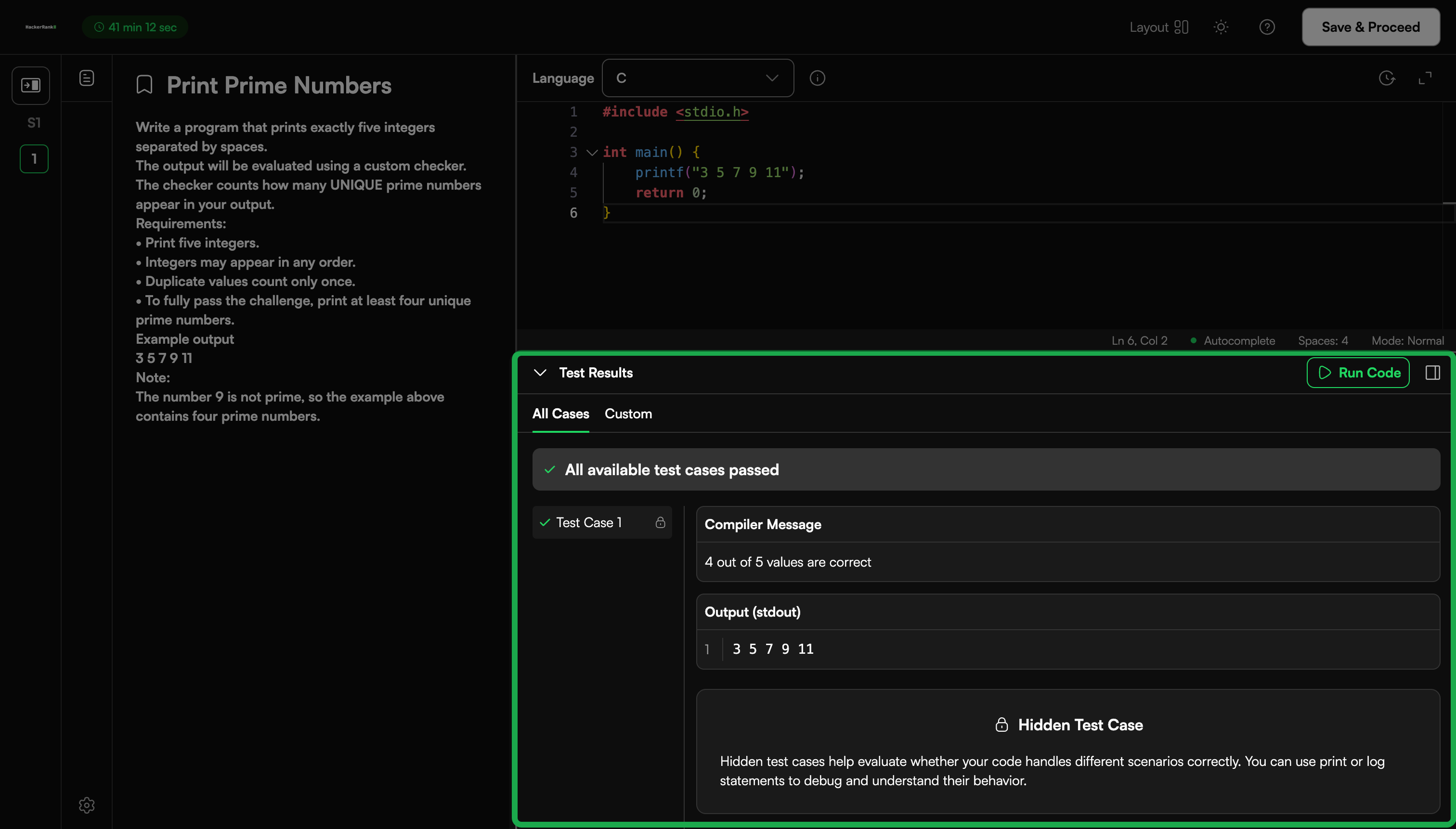
The following example checks whether the candidate outputs five unique prime numbers under 100.
Scoring logic:
Score = number of valid primes / 5
The candidate passes if at least four valid primes are correct
import re
# Function to determine if the given integer is a prime numberdef is_prime_number(x):
    if x >= 2:
        for y in range(2, x):
            if not x % y:
                return False
    else:
        return False
    return True

def run_custom_checker(t_obj, r_obj):
    result_data = ''
    try:
        result_data = open(t_obj.testcase_output_path, 'r').read()
    except IOError:
        r_obj.result = False
        r_obj.score = 0
        r_obj.message = 'Error reading result file'
        return

    # Read contents of the result file
    values = re.split(' |\n', result_data)

    # Make sure all the values are unique
    uniq_values = set(values)

    # Count the number of primes
    correct_values = 0
    for value in uniq_values:
        if value and is_prime_number(int(value)):
                correct_values = correct_values + 1

    # Cutoff score to determine success
    if correct_values > 3:
        r_obj.result = True
    else:
        r_obj.result = False
    r_obj.score = correct_values / 5
    r_obj.message = str(correct_values) + ' out of 5 values are correct'
Result
You can also view a similar custom checker example in Java.